PH
PHStaticPhantom
Established

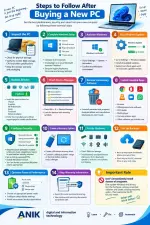
 JUST BOUGHT A NEW PC? DON’T START INSTALLING EVERYTHING YET!
Getting a new computer is exciting—but the first few steps can make a big difference in its security, performance, stability, and lifespan.
Before you start loading it with software, make sure you:
 Inspect the PC and verify the specifications Complete Windows setup & activation Install all Windows updates Update the important drivers Check Device Manager for errors Remove unnecessary/bloatware software Install only the apps you actually need Configure security settings Create a recovery option Test the hardware and ports Set up a proper backup Optimize power & startup settings Keep your warranty and serial-number information safe
 Pro Tip: Don’t install dozens of programs immediately. Update → Secure → Test → Backup → Customize.
 Save this checklist—you’ll need it whenever you set up a new PC!
Credit to : ANIK Digital & Information Technology
Learn • Fix • Automate
#NewPCSetup #ComputerTips #Windows11 #TechTips #canada #uk