 PH
PH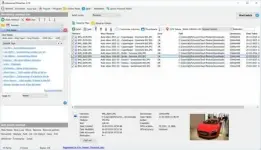
Free Download Advanced Renamer 4.25 (x64) Multilingual | 25.2 Mb
Advanced Renamer is a file and folder renaming utility designed to process multiple items at once. It uses configurable renaming methods to modify names, attributes, and timestamps according to rules defined by the user.
The software provides 14 different methods that can be combined into batch jobs for handling large collections of files. Files can also be copied or moved to different locations based on information contained in the selected items.
Advanced Renamer allows users to construct new file names by adding, removing, replacing, or changing the case of text. Before applying changes, the expected results can be verified, and complete batch operations can be undone if necessary.
Software Overview
Advanced Renamer provides a batch-based approach to organizing files and folders. Multiple renaming methods can be configured and applied to large groups of items, reducing the need to rename files individually.
The software can generate file names from existing information and supports operations such as adding, removing, replacing, and changing text case. It can also modify file attributes and timestamps as part of a configured batch.
A preview function lets users check the resulting file names before the operation is performed. If a completed batch produces unwanted results, the entire operation can be undone.
Key Features
- Rename multiple files and folders in a single batch.
- Use 14 different methods for modifying file names, attributes, and timestamps.
- Add, remove, or replace text in file names.
- Change the case of file names.
- Generate new file names from known file information.
- Copy or move files to new locations based on file information.
- Combine multiple renaming methods in one batch job.
- Preview expected file name changes before applying them.
- Undo complete batch operations when necessary.
Advanced Renamer is useful for organizing large collections of files where consistent naming rules need to be applied across many items. Its batch workflow allows multiple operations to be combined and processed together.
The preview and undo functions provide additional control over large-scale renaming tasks, while the variety of available methods makes it possible to adapt file names to different organizational requirements.
System Requirements
Operating System: Windows XP, Vista, 7, 8/8.1, 10
Home Page
Code:
https://www.advancedrenamer.com- Software Name: Advanced Renamer
- Version: 4.25
- Architecture: x64
- Languages:Multilingual
- License type:Full Version
- File Size:25.2 Mb
Download ( Rapidgator )
You do not have permission to view the full content of this post. Log in or register now.
UploadCloud
You do not have permission to view the full content of this post. Log in or register now.
DDownload
You do not have permission to view the full content of this post. Log in or register now.
FreeDL
You do not have permission to view the full content of this post. Log in or register now.