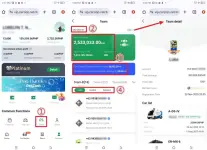
Through your Carziqo account, you can view all the detailed information about your team.
① Tap “Team.”
② Tap “My referrer” to see information about your referrer.
③ You can also check key team details, such as team size, total team deposits, Team Value-Added Earnings.
④ You can review the status of members in your team:
- “Valid” (active/full members)
- “Invalid” (registered members who have not leased a car)
- “Expired” (members whose car has expired and who have not leased a new one yet)
By proactively checking your team information every day, staying on top of each member’s progress, and maintaining effective communication with your downline, you can take responsibility for every team member. You’ll also be able to manage your team more effectively.