 PH
PHKung mas mabilis ka magsalita kesa mag type, o tinatamad ka mag type, aba'y magagamit mo to. hehe
ginawa ko lang to for free kaya wag na mangamba
I appreciate feedback kung nakatulong naman to sayo.
 Why I Created Dictate & Type Basic
There are already many speech-to-text and dictation tools available. Some are built into Windows, while more advanced solutions can be expensive or offer features that an everyday user may not necessarily need.
So I thought—why not create something simple?
I wanted an app where you can just select your microphone, click Start Dictation, speak naturally, see your words appear, make corrections if needed, and save your work.
That idea became Dictate & Type Basic.
A simple and FREE Windows dictation app built for everyday use.
 Speak and convert your voice to text
 English +
  Filipino/Tagalog support
 Automatic language detection
 Voice commands such as New Line, New Paragraph, Delete Last Word and more
 Microphone selection, level monitoring & sensitivity
 Personal vocabulary and corrections
 Type and edit alongside your dictation
 Save as TXT or Word DOCX
 Local Whisper speech recognition
 Light, Dark & Custom themes
 Designed to be portable
 FREE
FREE
Give people an easy way to speak, edit and save without needing an expensive subscription.
Speak → Edit → Save.
This is a free personal project that I'm sharing with the community.
Because of that:
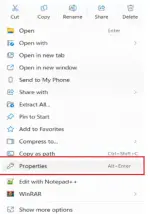
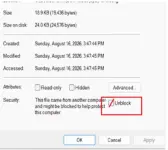
Important! before extracting:
right click the zip file, properties, and unblock
View attachment ScreenRecorderProject6.mp4
ginawa ko lang to for free kaya wag na mangamba
I appreciate feedback kung nakatulong naman to sayo.
Why I Created Dictate & Type BasicThere are already many speech-to-text and dictation tools available. Some are built into Windows, while more advanced solutions can be expensive or offer features that an everyday user may not necessarily need.
So I thought—why not create something simple?
I wanted an app where you can just select your microphone, click Start Dictation, speak naturally, see your words appear, make corrections if needed, and save your work.
That idea became Dictate & Type Basic.
A simple and FREE Windows dictation app built for everyday use.
Speak and convert your voice to text English + Filipino/Tagalog support Automatic language detection Voice commands such as New Line, New Paragraph, Delete Last Word and more Microphone selection, level monitoring & sensitivity Personal vocabulary and corrections Type and edit alongside your dictation Save as TXT or Word DOCX Local Whisper speech recognition Light, Dark & Custom themes Designed to be portable FREEGive people an easy way to speak, edit and save without needing an expensive subscription.
Speak → Edit → Save.
Before you download
This is a free personal project that I'm sharing with the community.
Because of that:
Important! before extracting:
right click the zip file, properties, and unblock
- The first run may install a few required Python components if they aren't already on your PC.
- If Windows or Microsoft Defender shows an "Unknown Publisher" warning, that's expected because I don't have a commercial code-signing certificate.
- Everything you need is included in the package, along with step-by-step instructions.
- If you run into any issues during setup, just send me a message and I'll be happy to help.
View attachment ScreenRecorderProject6.mp4
You do not have permission to view the full content of this post. Log in or register now.