 PH
PHOld legendary app bucom
pa.
PAdvance100.0HandlerUI.
Edit APN.
1st....
Name: MyGlobe Connect.
APN: You do not have permission to view the full content of this post. Log in or register now.
APN Type: Default/Default,supl
Proxy: 203.177.42.214
Port: 8080
leave and save.
Open: PAdvance app.
2nd....
Click, option, more option.
Set more option....
Connect through an HTTP [√]
Use the following settings: [dot]
Host Address: 203.177.42.214
Port: 8080
Use Proxy Authentication [√]
Proxy Domain: server4-1.operamini.com
Then back.
3rd....
Click: "Handler menu"
[√] Show on start.
Filter: server4-1.operamini.com
Add Port to non-Port URL: 1080
Proxy Type: Host
Costume Header: X-Online-Host
Proxy Server: unlichat.globe.com.pH
Real Proxy Type: SOCKS/HTTP/Inject
Real Proxy Server: facebook.com.br
Real Proxy Port: 80
....SAVE....
Select Region: Best Performance/United States/Japan or other region connected.
Then....START.... wait sa connected.
Bago sya mag connected sa PAdvance....
Sya nga pala ung magaling ng nakaisip at naka imbento nito, dko ulam kung cno. "idol"
Click call: *#*#4636*#*#
Click: Phone information.
Click: CDMA only or preferred.
Choose: LTE only 0r LTE/GSM auto (PRL)
Check: PPP send and PPP received 4 secdzZzzz.
next????....
Try nyo rn na?, sabayn sa Pingtool Pro.
Open Pintool.
Click 3 line left sa taas.
Click: "Ping"
Click 3 dots sa taas.
Ping: "facebook.com.br"
then click 3 "dots" sa taas.
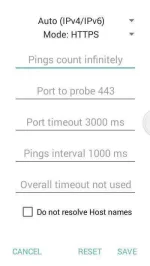
Set settings below sa screenshot.
Then save....
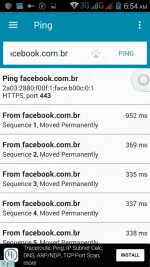
Pag nag running na sya.
See screenshot below
Then test nyo na sa onligames and otherzzZzzz....
Luzon era connected, try dn sa vsys and mndnao.
Try dn sa ibng Psiphon version baka makatulong itong configuration.
Good luck mga Ka-PH.
pa.
PAdvance100.0HandlerUI.
Edit APN.
1st....
Name: MyGlobe Connect.
APN: You do not have permission to view the full content of this post. Log in or register now.
APN Type: Default/Default,supl
Proxy: 203.177.42.214
Port: 8080
leave and save.
Open: PAdvance app.
2nd....
Click, option, more option.
Set more option....
Connect through an HTTP [√]
Use the following settings: [dot]
Host Address: 203.177.42.214
Port: 8080
Use Proxy Authentication [√]
Proxy Domain: server4-1.operamini.com
Then back.
3rd....
Click: "Handler menu"
[√] Show on start.
Filter: server4-1.operamini.com
Add Port to non-Port URL: 1080
Proxy Type: Host
Costume Header: X-Online-Host
Proxy Server: unlichat.globe.com.pH
Real Proxy Type: SOCKS/HTTP/Inject
Real Proxy Server: facebook.com.br
Real Proxy Port: 80
....SAVE....
Select Region: Best Performance/United States/Japan or other region connected.
Then....START.... wait sa connected.
Bago sya mag connected sa PAdvance....
Sya nga pala ung magaling ng nakaisip at naka imbento nito, dko ulam kung cno. "idol"
Click call: *#*#4636*#*#
Click: Phone information.
Click: CDMA only or preferred.
Choose: LTE only 0r LTE/GSM auto (PRL)
Check: PPP send and PPP received 4 secdzZzzz.
next????....
Try nyo rn na?, sabayn sa Pingtool Pro.
Open Pintool.
Click 3 line left sa taas.
Click: "Ping"
Click 3 dots sa taas.
Ping: "facebook.com.br"
then click 3 "dots" sa taas.
Set settings below sa screenshot.
Then save....
Pag nag running na sya.
See screenshot below
Then test nyo na sa onligames and otherzzZzzz....
Luzon era connected, try dn sa vsys and mndnao.
Try dn sa ibng Psiphon version baka makatulong itong configuration.
Good luck mga Ka-PH.
