PH
PH
𝙲𝚛𝚞𝚗𝚌𝚑𝚢𝚛𝚘𝚕𝚕 Mega Fan Cookies
Country: Chile
You do not have permission to view the full content of this post. Log in or register now.
For Android Phone
Installation Guide
- Download Kiwi Browser from the Google Play Store.
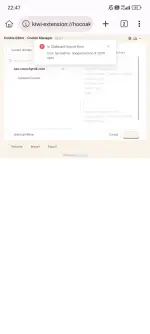
- Open Kiwi Browser and go to the Chrome Web Store.
- Search for the Cookie-Editor extension.
- Tap Add to Chrome to install it into your mobile browser.
- Go to 𝙲𝚛𝚞𝚗𝚌𝚑𝚢𝚛𝚘𝚕𝚕 website.
- Tap the three dots menu in the top/bottom right corner of Kiwi Browser.
- Scroll down to the bottom of the menu and select Cookie-Editor.
- Delete any old or existing cookies listed for that site by clicking delete on each.
- Copy the raw JSON cookie text provided in the thread.
- Click Import inside the Cookie-Editor menu, paste the cookie data into the text box, and confirm/import.
- Refresh the 𝙲𝚛𝚞𝚗𝚌𝚑𝚢𝚛𝚘𝚕𝚕 website to log into the session automatically.