PH
PHHandnasomepa
Forum Expert
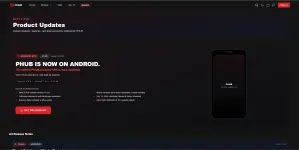
PHUB IS NOW ON ANDROID & ANDROID TV! 


Finally hahaha. May official APK na ang PHUB — Mobile, Tablet, at Android TV ready na!
Dati sa previous posts ko puro:
"Currently developing an APK version."
Ngayon released na talaga.

For those who haven't seen the original project, you can check my previous thread here:
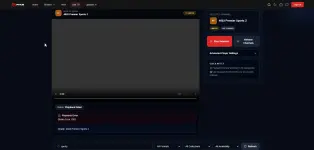
 My Own Movie & Series Streaming Web App — Previous Thread
That was where I originally shared PHUB when it was still mainly a web app. Since then, ang dami nang nadagdag at ngayon may sarili na rin siyang native Android APK na puwede sa phone, tablet, at smart TV!
PHUB ANDROID v1.0.0 (Dual-Platform Ready)
I built the Android version using Capacitor + React, then added native Android and Android TV features such as:
Android TV Leanback Home Screen & 16:9 Banner Support
Automatic D-Pad Remote Control Navigation (Spatial Arrow Keys + OK / Select)
Hardware back button handling
Fullscreen playback + automatic landscape mode
Network status & offline detection
Direct OTA update checking
Native Android & Android TV Experience
 WHAT'S INCLUDED?[/B]
Movies
TV Series
 Live TV
VMX / Vivamax
 Watchlist
 Continue Watching / Resume Playback
 Viewing History
 Search / Discover
Mobile & Tablet-friendly UI
Android TV / Google TV / Smart TV D-Pad Remote Support
 Automatic update checking for future releases
 ANDROID & TV-SPECIFIC FEATURES
• Android TV Leanback Launcher & Banner
Lilitaw ang PHUB icon diretso sa Android TV / Google TV home screen mo.
• Full Remote Control (D-Pad) Navigation
Puwede mong i-navigate ang buong app gamit ang arrow keys at OK button ng TV remote nang hindi nangangailangan ng mouse o touchscreen.
• Hardware Back Button
Navigate through the app naturally using the Android phone or TV remote back button.
• Fullscreen + Landscape Playback
When watching fullscreen, the app automatically switches to landscape mode.
• Network Status Detection
The app can detect when the device goes offline and shows a network status warning.
• OTA Update Checking
Future PHUB APK releases can notify you when a newer version is available.
 DOWNLOAD PHUB ANDROID & ANDROID TV APK
React muna para makita ang download link.
OFFICIAL PHUB ANDROID APK DOWNLOAD
You do not have permission to view the full content of this post. Log in or register now.
Version: 1.0.0 (Build 1)
Compatibility: Android 7.0+ (Mobile • Tablet • Android TV / Google TV)
APK Size: ~12.76 MB
Drive Link, Down pa yung Hosting. nag limit
You do not have permission to view the full content of this post. Log in or register now.
 IMPORTANT
Official PHUB download page lang ang gamitin:
You do not have permission to view the full content of this post.
Log in or register now.
Please avoid downloading PHUB APK files from random third-party websites.
PAANO I-INSTALL SA ANDROID TV?
1. I-download ang APK sa computer/phone.
2. I-transfer sa USB drive o gamitin ang Send Files to TV app.
3. Buksan ang file gamit ang kahit anong File Manager sa Android TV at i-click ang Install.
4. Lilitaw na ito sa TV Apps Home Screen at puwede nang gamitan ng remote control!
 WEB VERSION
Kung ayaw niyo muna mag-install ng APK, available pa rin yung original web version:
You do not have permission to view the full content of this post.
Log in or register now.
 STILL DEVELOPING / IMPROVING
This is only v1.0.0, so expect more improvements, optimizations, and features in future releases.
 TECH STACK
React
Vite
Capacitor
Node.js
 FEEDBACK / BUG REPORTS
If you try the APK on your phone, tablet, or Android TV, feedback and bug reports are very welcome!
Kung may hindi gumana sa device niyo, pakilagay na rin:
• Device model (Phone / TV Box / Smart TV brand)
• Android version
• Anong feature ang may problema
• Screenshot/video kung possible
Para mas madali kong ma-reproduce at ma-fix.
 FROM WEB APP → PWA → ANDROID APK (PHONE & TV)
This started as a simple personal movie & series streaming web app.
Then naging PWA.
Then added Android TV Leanback & D-Pad Remote navigation.
And ngayon...
PHUB IS NOW ON ANDROID & ANDROID TV!
Still working on it and improving things little by little.
Thanks sa lahat ng nag-test, nagbigay ng feedback, nag-report ng bugs, at nag-support sa previous thread.
Previous PHUB thread:
https://phcorner.org/threads/2496471/
 d
d
Finally hahaha. May official APK na ang PHUB — Mobile, Tablet, at Android TV ready na!
Dati sa previous posts ko puro:
"Currently developing an APK version."
Ngayon released na talaga.
For those who haven't seen the original project, you can check my previous thread here:
My Own Movie & Series Streaming Web App — Previous ThreadThat was where I originally shared PHUB when it was still mainly a web app. Since then, ang dami nang nadagdag at ngayon may sarili na rin siyang native Android APK na puwede sa phone, tablet, at smart TV!
PHUB ANDROID v1.0.0 (Dual-Platform Ready)I built the Android version using Capacitor + React, then added native Android and Android TV features such as:
Android TV Leanback Home Screen & 16:9 Banner Support Automatic D-Pad Remote Control Navigation (Spatial Arrow Keys + OK / Select) Hardware back button handling Fullscreen playback + automatic landscape mode Network status & offline detection Direct OTA update checking Native Android & Android TV Experience WHAT'S INCLUDED?[/B] Movies TV Series Live TV VMX / Vivamax Watchlist Continue Watching / Resume Playback Viewing History Search / Discover Mobile & Tablet-friendly UI Android TV / Google TV / Smart TV D-Pad Remote Support Automatic update checking for future releases ANDROID & TV-SPECIFIC FEATURES• Android TV Leanback Launcher & Banner
Lilitaw ang PHUB icon diretso sa Android TV / Google TV home screen mo.
• Full Remote Control (D-Pad) Navigation
Puwede mong i-navigate ang buong app gamit ang arrow keys at OK button ng TV remote nang hindi nangangailangan ng mouse o touchscreen.
• Hardware Back Button
Navigate through the app naturally using the Android phone or TV remote back button.
• Fullscreen + Landscape Playback
When watching fullscreen, the app automatically switches to landscape mode.
• Network Status Detection
The app can detect when the device goes offline and shows a network status warning.
• OTA Update Checking
Future PHUB APK releases can notify you when a newer version is available.
DOWNLOAD PHUB ANDROID & ANDROID TV APKReact muna para makita ang download link.
OFFICIAL PHUB ANDROID APK DOWNLOADYou do not have permission to view the full content of this post. Log in or register now.
Version: 1.0.0 (Build 1)
Compatibility: Android 7.0+ (Mobile • Tablet • Android TV / Google TV)
APK Size: ~12.76 MB
Drive Link, Down pa yung Hosting. nag limit
You do not have permission to view the full content of this post. Log in or register now.
IMPORTANTOfficial PHUB download page lang ang gamitin:
You do not have permission to view the full content of this post.
Log in or register now.Please avoid downloading PHUB APK files from random third-party websites.
PAANO I-INSTALL SA ANDROID TV?1. I-download ang APK sa computer/phone.
2. I-transfer sa USB drive o gamitin ang Send Files to TV app.
3. Buksan ang file gamit ang kahit anong File Manager sa Android TV at i-click ang Install.
4. Lilitaw na ito sa TV Apps Home Screen at puwede nang gamitan ng remote control!
WEB VERSIONKung ayaw niyo muna mag-install ng APK, available pa rin yung original web version:
You do not have permission to view the full content of this post.
Log in or register now. STILL DEVELOPING / IMPROVINGThis is only v1.0.0, so expect more improvements, optimizations, and features in future releases.
TECH STACKReact
Vite
Capacitor
Node.js
FEEDBACK / BUG REPORTSIf you try the APK on your phone, tablet, or Android TV, feedback and bug reports are very welcome!
Kung may hindi gumana sa device niyo, pakilagay na rin:
• Device model (Phone / TV Box / Smart TV brand)
• Android version
• Anong feature ang may problema
• Screenshot/video kung possible
Para mas madali kong ma-reproduce at ma-fix.
FROM WEB APP → PWA → ANDROID APK (PHONE & TV)This started as a simple personal movie & series streaming web app.
Then naging PWA.
Then added Android TV Leanback & D-Pad Remote navigation.
And ngayon...
PHUB IS NOW ON ANDROID & ANDROID TV!
Still working on it and improving things little by little.
Thanks sa lahat ng nag-test, nagbigay ng feedback, nag-report ng bugs, at nag-support sa previous thread.
Previous PHUB thread:
https://phcorner.org/threads/2496471/d