 PH
PH PEOPLE ARE USING NOTEBOOKLM TO MASS PRODUCE SPECIALIZED CLAUDE SKILLS IN MINUTES.
Instead of writing the same prompts over and over, they turn curated knowledge into reusable "SKILL▪︎md" files that give Claude consistent expertise for specific tasks.
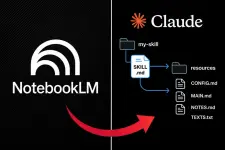
Here's how it works

1. Build a Knowledge Hub
Gather your reference files for a specific task into one Notebook:
→ SOPs & Process Guides
→ Research papers & PDFs
→ Transcripts & notes
This becomes the reference library for your new Skill.
2. Generate the skill▪︎md. File
Copy and paste this prompt into NotebookLM :
"Turn all uploaded sources into a standardized skill▪︎md file for [TARGET ROLE/TASK].
Format with 4 clear sections:
1. Purpose
2. Step-by-Step Workflow
3. Strict Rules & Constraints
4. Output Template tailored for [PREFERRED OUTPUT TYPE].
Rely strictly on the sources provided."
3. Load It into Claude
Save NotebookLM's output as skill▪︎md and drop it into your Claude folder (or Claude Code skills directory).
Now, Claude follows that exact playbook whenever you trigger it no extra setup needed.
4. Build Micro-Tools
Don't create one giant Skill that tries to do everything.
Build simple tools for everyday tasks:
→ Social Media Posts: Turn rough notes or articles into ready-to-post updates in your exact brand voice.
→ Meeting Recaps: Convert messy call notes into clear action items and follow-up emails.
→ Document Summaries: Condense long 30-page PDFs into 1-page executive summaries and key takeaways.
5. Why This System Wins
→ Zero Drift: Instructions stay locked in place.
→ Exact Consistency: Every output follows your precise standard.
→ Reusable Asset: Build it once, use it forever.
 The Shift:
Instead of collecting random prompts you'll never use, start building reusable systems.