 PH
PHflamendless
Fanatic
Hi mga kaPH, naranasan nyo na bang accidentally madelete ang mga mahahalagang config files? At tila walang recovery? Walang recycle bin eh haha. Pwes, just follow me.
Download first yung "Macrodroid" sa playstore.
Open app.
Choose "add macro"
Para sa trigger, choose notification, then select nyo yung any app, then choose "containing" then input "ehi" or kung ano mang file.
Then swipe papunta sa action tab, choose file manager v2, then select move/copy, go to the directory kung saan nasesave yung mga files nyo, then dun sa input na may *, lagay nyo ".ehi" <==== walang quotations ah. Then after nyan select nyo yung directory kung saan nyo isesave. Then voila! Tapos na.
Kung gusto nyong makasure, dun sa action tab, ichoose nyo din yung "popup message" then alam nyo na yan hehe. Try magdownload ng kahit anong .ehi file. Then ayun.
Like lang okay na sakin. Thanks.
Eti screenshot ng macro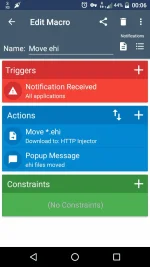
Download first yung "Macrodroid" sa playstore.
Open app.
Choose "add macro"
Para sa trigger, choose notification, then select nyo yung any app, then choose "containing" then input "ehi" or kung ano mang file.
Then swipe papunta sa action tab, choose file manager v2, then select move/copy, go to the directory kung saan nasesave yung mga files nyo, then dun sa input na may *, lagay nyo ".ehi" <==== walang quotations ah. Then after nyan select nyo yung directory kung saan nyo isesave. Then voila! Tapos na.
Kung gusto nyong makasure, dun sa action tab, ichoose nyo din yung "popup message" then alam nyo na yan hehe. Try magdownload ng kahit anong .ehi file. Then ayun.
Like lang okay na sakin. Thanks.
Eti screenshot ng macro