 PH
PHChessis: Chess Analysis v19.4 b194 [Premium]
Requirements: 5.0+
Overview: Analyze chess games, detect mistakes & blunders, and improve your chess!
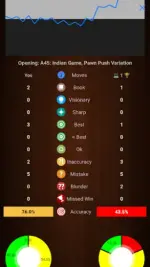
Chessis is a powerful Chess Analysis app that helps you improve your game!
 Recent Updates:
Chess Image Scanner — scan 2D chess board images for instant analysis
 Engine vs Engine — watch engines battle each other
Smart Analysis — deeper insights, enable in analysis settings
Stockfish 18 — the latest and strongest engine
 App Shortcuts — long-press the app icon for quick access
Lichess Games — browse and analyze your Lichess games directly
Annotated PGN Export — select and download annotated games
13 languages supported
 Analyze your games and get detailed game reports
Analyze chess positions with Stockfish engine
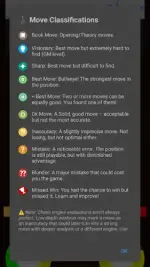
Detect blunders, mistakes, missed wins, and best moves
Play chess against the computer at your level
Set up board positions (Board Editor) and analyze them
Open PGN files (PGN Viewer)
Get blunder alerts and learn why it was a blunder
Add multiple engine lines
Play engine lines
Customize board colors and pieces
Analyze your chess games from Chess.com or Lichess
Export annotated PGN
Adjust game report depth
Chess960 (Fischer Random Chess)
Games database with FEN search
Add OEX engines
Change engine settings like hash value and threads
List of all chess openings to explore
Play chess on the clock or set engine think time
Average centipawn loss on game reports
Analyze games by time or depth
Show threats
Accuracy percentage
Draw arrows on the board
Chessis is one of the best chess analysis apps available. It helps you improve your chess by analyzing your games and providing detailed game reports with blunders, missed wins, best moves, and more. It not only shows you where you made a mistake but also explains why it was a mistake.
To support the app, we offer a Pro version with extra benefits. Most features are free, but Pro gives you:
Play/Show "Why Blunder" line
Play engine lines
Enable NNUE
Add unlimited engine lines
Adjust game report depth
Adjust game report time
Deep analysis
Show each move's strength while playing
Get mistake alerts while playing
No ads
Analyze unlimited games forever!
Key Elements
Note: Deep analysis provides much more accurate and consistent results compared to quick analysis.
Let's analyze chess with Chessis!
Notes:
Board Editor (Board scanner will only work on arm64 devices).
Apk Details:
arm7+arm64
Size: 27.1 MB
SHA-256: 6d64ceff2ef1584502563935d90c0d7f4d53ed411079a76cd4b3c65ae5b7eefc
What's New:
What's New
Retry mistakes from games. (Even from multiple games from Games Archive)
3D pieces — add your own! Settings → Board Themes → tap ⋮ next to Pieces, then pick a ZIP of 3D pieces (SVG/PNG).
️ Custom backgrounds — Settings → Board Themes → tap ⋮ next to Background.
New avatars.
 Screen reader support for blind & low-vision players.
Download Links:
arm7+arm64
You do not have permission to view the full content of this post. Log in or register now.
Mirrors:
You do not have permission to view the full content of this post. Log in or register now.
Credit to: youarefinished
Requirements: 5.0+
Overview: Analyze chess games, detect mistakes & blunders, and improve your chess!
Chessis is a powerful Chess Analysis app that helps you improve your game!
Recent Updates:Chess Image Scanner — scan 2D chess board images for instant analysis
Engine vs Engine — watch engines battle each otherSmart Analysis — deeper insights, enable in analysis settings
Stockfish 18 — the latest and strongest engine
App Shortcuts — long-press the app icon for quick accessLichess Games — browse and analyze your Lichess games directly
Annotated PGN Export — select and download annotated games
13 languages supported
Analyze your games and get detailed game reports Analyze chess positions with Stockfish engine Detect blunders, mistakes, missed wins, and best moves Play chess against the computer at your level Set up board positions (Board Editor) and analyze them Open PGN files (PGN Viewer) Get blunder alerts and learn why it was a blunder Add multiple engine lines Play engine lines Customize board colors and pieces Analyze your chess games from Chess.com or Lichess Export annotated PGN Adjust game report depth Chess960 (Fischer Random Chess) Games database with FEN search Add OEX engines Change engine settings like hash value and threads List of all chess openings to explore Play chess on the clock or set engine think time Average centipawn loss on game reports Analyze games by time or depth Show threats Accuracy percentage Draw arrows on the boardChessis is one of the best chess analysis apps available. It helps you improve your chess by analyzing your games and providing detailed game reports with blunders, missed wins, best moves, and more. It not only shows you where you made a mistake but also explains why it was a mistake.
To support the app, we offer a Pro version with extra benefits. Most features are free, but Pro gives you:
Play/Show "Why Blunder" line Play engine lines Enable NNUE Add unlimited engine lines Adjust game report depth Adjust game report time Deep analysis Show each move's strength while playing Get mistake alerts while playing No ads Analyze unlimited games forever! Key ElementsNote: Deep analysis provides much more accurate and consistent results compared to quick analysis.
Let's analyze chess with Chessis!
Notes:
Board Editor (Board scanner will only work on arm64 devices).
Apk Details:
arm7+arm64
Size: 27.1 MB
SHA-256: 6d64ceff2ef1584502563935d90c0d7f4d53ed411079a76cd4b3c65ae5b7eefc
What's New:
What's New
Retry mistakes from games. (Even from multiple games from Games Archive)
3D pieces — add your own! Settings → Board Themes → tap ⋮ next to Pieces, then pick a ZIP of 3D pieces (SVG/PNG).️ Custom backgrounds — Settings → Board Themes → tap ⋮ next to Background.
New avatars.
Screen reader support for blind & low-vision players.Download Links:
arm7+arm64
You do not have permission to view the full content of this post. Log in or register now.
Mirrors:
You do not have permission to view the full content of this post. Log in or register now.
Credit to: youarefinished