 PH
PHArduinoDroid - Arduino/ESP IDE v9.2.0 b9204 [Premium] [Bundle]
Requirements: 8.0+ | Split-apk Installer
Overview: Write sketches,compile and upload to Arduino/ESP8266/ESP32 over USB/WiFi with AI
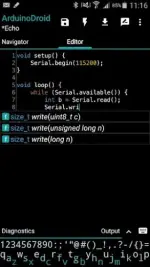
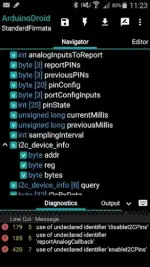
Write with code complete and libraries, compile, upload Arduino or ESP8266/ESP32 (including ESP32S2, ESP32S3, ESP32C3, ESP32C6) sketches over USB or WiFi and monitor your board right from your Android device with ArduinoDroid and built-in AI assistant. No internet connection, no cloud service account is required.
Note:
SDKs are downloaded from Google Play when ESP board is chosen. Once downloaded it does not require internet connection anymore.
Features:
App blog:
You do not have permission to view the full content of this post. Log in or register now.
Troubleshooting:
You do not have permission to view the full content of this post. Log in or register now.
Advanced ρáíd features (marked with *) review:
You do not have permission to view the full content of this post. Log in or register now.
Note: this is NOT an official Arduino team application, but a 3rd-party mobile application with the same functionality developed and supported by an independent developer.
© "Arduino" is a trademark of Arduino team.
Notes:
Apks Bundle Installation:
• Download And Install Latest SAI App (Split APK Installer) - You do not have permission to view the full content of this post. Log in or register now.
• Download this .apks Archive App;
• Install And Open SAI / Choose "Install APKs" Button / Find And Select Downloaded .apks Archive App;
Wait For Install And Done. Enjoy!
Apk Details:
arm64
Size: 121.2 MB
SHA-256: 5ba3bf72cefde9196a6028037813c7111a07969c189d1cedf1520f802be8c827
What's New:
Download Links:
arm64
You do not have permission to view the full content of this post. Log in or register now.
Mirrors:
You do not have permission to view the full content of this post. Log in or register now.
Credit to: youarefinished
Requirements: 8.0+ | Split-apk Installer
Overview: Write sketches,compile and upload to Arduino/ESP8266/ESP32 over USB/WiFi with AI
Write with code complete and libraries, compile, upload Arduino or ESP8266/ESP32 (including ESP32S2, ESP32S3, ESP32C3, ESP32C6) sketches over USB or WiFi and monitor your board right from your Android device with ArduinoDroid and built-in AI assistant. No internet connection, no cloud service account is required.
Note:
SDKs are downloaded from Google Play when ESP board is chosen. Once downloaded it does not require internet connection anymore.
Features:
- onboarding
- open/edit Arduino/ESP sketches
- example sketches and libraries included
- code syntax highlighting with themes support *
- code complete *
- real-time diagnostics (errors and warnings) and fixes *
- file navigator *
- tiny built-in software keyboard *
- compile sketches (no root required)
- upload sketches over USB (all ESP8266 boards, all ESP32 boards, ESP32C3, ESP32C6, ESP32S2, ESP32S3, Arduino Uno/Uno_r3, Duemilanove, Nano, Mega 2560, Leonardo, Micro/Pro Micro, Pro, Pro Mini, Yun, Esplora, Robot Control, Robot Motor boards are supported, android devices with USB-host support required) and WiFi (OTA for ESP8266/ESP32/ESP32S3)
- serial monitor
- works offline (no internet connection required)
- on-device AI (no internet connection required, no cloud inference costs)
- Dropbox support
- Library Manager
- Google Drive support
- material design
App blog:
You do not have permission to view the full content of this post. Log in or register now.
Troubleshooting:
You do not have permission to view the full content of this post. Log in or register now.
Advanced ρáíd features (marked with *) review:
You do not have permission to view the full content of this post. Log in or register now.
Note: this is NOT an official Arduino team application, but a 3rd-party mobile application with the same functionality developed and supported by an independent developer.
© "Arduino" is a trademark of Arduino team.
Notes:
Apks Bundle Installation:
• Download And Install Latest SAI App (Split APK Installer) - You do not have permission to view the full content of this post. Log in or register now.
• Download this .apks Archive App;
• Install And Open SAI / Choose "Install APKs" Button / Find And Select Downloaded .apks Archive App;
Wait For Install And Done. Enjoy!
Apk Details:
arm64
Size: 121.2 MB
SHA-256: 5ba3bf72cefde9196a6028037813c7111a07969c189d1cedf1520f802be8c827
What's New:
- Fixed: crashes in some cases
- Fixed compilation failure: if custom type used in function signatures
- UI improvement: showing sketch files in a drop-down list (if more than 3 on smartphone or more than 5 on tablet)
Download Links:
arm64
You do not have permission to view the full content of this post. Log in or register now.
Mirrors:
You do not have permission to view the full content of this post. Log in or register now.
Credit to: youarefinished