 PH
PHCMD ADB Remove FRP Android 15/16/17 Latest 2026: How To Remove The FRP After Unlocking Your Phone; Relock Fixed Problem By CMD Command New Script Solution For All Android After Allowing USB Debugging Mode.
How To Use The Tool:
Download the file below the Article:
Extract The File.
Method works on Samsung latest updates.
After unlocking FRP (By PC or manually).
Enable USB Debugging.
Connect the phone to the PC (USB cable).
Click Start, wait for FRP Done and Fixed Relock.
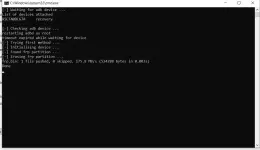
ci. C:\Windows\system32\cmd.exe
I-] Waiting for adb device... aList of devices attached
RSCTAODLGA
recovery
[-1 Checking adb device...
restarting adb as root
Itimeout expired while waiting for device it [-] Trying first method...
[-] Initialising device...
i-i Found frp partition... t[-] Erasing frp partition...
frp.bin: 1 file pushed, 0 skipped. 175.8 MB/s (524288 bytes in 0.003s)
Done
CMD ADB Remove FRP Android 15/16/17
Download
MOBILedit Forensic
Download
Video Tutorial: How To Remove FRP:
CTTO of this Video Tutorial:
How To Use The Tool:
Download the file below the Article:
Extract The File.
Method works on Samsung latest updates.
After unlocking FRP (By PC or manually).
Enable USB Debugging.
Connect the phone to the PC (USB cable).
Click Start, wait for FRP Done and Fixed Relock.
ci. C:\Windows\system32\cmd.exe
I-] Waiting for adb device... aList of devices attached
RSCTAODLGA
recovery
[-1 Checking adb device...
restarting adb as root
Itimeout expired while waiting for device it [-] Trying first method...
[-] Initialising device...
i-i Found frp partition... t[-] Erasing frp partition...
frp.bin: 1 file pushed, 0 skipped. 175.8 MB/s (524288 bytes in 0.003s)
Done
CMD ADB Remove FRP Android 15/16/17
Download
MOBILedit Forensic
Download
Video Tutorial: How To Remove FRP:
CTTO of this Video Tutorial: