 PH
PH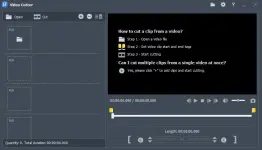
Free Download Fast Video Cutter Joiner 7.1.6 Multilingual Portable Fast Links | 44.3 Mb
Fast Video Cutter Joiner Portable is a lightweight video editing application that allows users to trim unwanted sections from videos and merge multiple clips into a single file without requiring a traditional installation. The portable edition provides the same core functionality while offering greater flexibility for users who prefer running the software from removable storage or temporary work environments.
Designed for quick video editing tasks, the application enables users to cut precise video segments, combine recordings, and convert output files into different video formats. Its straightforward interface makes common editing operations easy to perform without navigating complex editing tools.
Fast Video Cutter Joiner Portable is suitable for content creators, educators, and everyday users who need a convenient solution for preparing video clips, creating compilations, or removing unnecessary footage while preserving the original video quality whenever supported.
Software OverviewFast Video Cutter Joiner Portable provides essential tools for trimming and merging video files in a compact desktop application. Users can define custom start and end points, extract selected video segments, and combine multiple clips into a single output file through an intuitive workflow.
The application supports simultaneous processing of multiple clips and offers lossless cutting for compatible video formats to preserve original quality. After editing, clips can also be converted into other supported video formats for broader compatibility.
Supporting common formats such as MP4, AVI, MPEG, RMVB, and others, the software provides an efficient solution for handling routine video editing tasks while remaining easy to operate.
Key Features
- Trim selected portions from video files.
- Merge multiple video clips into a single video.
- Process multiple video clips simultaneously.
- Support fast video cutting operations.
- Maintain original quality during supported lossless cutting.
- Convert edited clips into other video formats.
- Support popular video formats including MP4, AVI, MPEG, and RMVB.
- Set custom start and end positions for video trimming.
- Preview video clips during editing.
- Portable edition for flexible deployment without a traditional installation process.
Why Choose Fast Video Cutter JoinerFast Video Cutter Joiner is a practical choice for users who need quick video trimming and merging without the complexity of full-featured video editing suites. The portable edition adds flexibility by allowing the application to be used across different Windows systems while maintaining the same editing capabilities.
Its streamlined workflow is well suited for preparing video clips, combining recordings, and performing routine editing tasks efficiently.
System RequirementsWindows operating system.
Frequently Asked Questions
What is Fast Video Cutter Joiner Portable used for?It is used for trimming unwanted video sections, merging multiple clips, and converting edited videos into different formats.
Does the portable edition require installation?No. The portable edition is distributed in a portable format that does not require a traditional installation process.
Can Fast Video Cutter Joiner Portable merge multiple videos?Yes, it supports combining multiple video files into a single output file.
Does the software support common video formats?Yes, it supports popular formats including MP4, AVI, MPEG, RMVB, and others.
Home Page
Code:
https://www.videocutterjoiner.com/Product Information
- Software Name: Fast Video Cutter Joiner
- Version: 7.1.6
- Languages: Multilingual
- License type: Portable
- File Size: 44.3 Mb
Download ( Rapidgator )
You do not have permission to view the full content of this post. Log in or register now.
UploadCloud
You do not have permission to view the full content of this post. Log in or register now.
DDownload
You do not have permission to view the full content of this post. Log in or register now.
FreeDL
You do not have permission to view the full content of this post. Log in or register now.