 PH
PH50 Hidden Symbol Shortcuts in Microsoft Word You Should Know! 
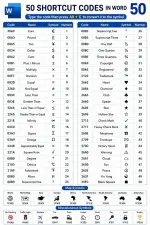
Did you know that Microsoft Word lets you insert dozens of special symbols without opening the Symbol menu?
Simply type the Unicode code, then press Alt + X to instantly convert it into the corresponding symbol. This works for currency signs, math operators, fractions, Greek letters, check marks, hearts, stars, and many other useful characters.
Learning these shortcuts can save time and make your documents look more professional.
Which Word shortcut do you use the most? Let us know in the comments!
#MicrosoftWord #MSWord #WordTips #OfficeTips #Productivity #TechTips
Did you know that Microsoft Word lets you insert dozens of special symbols without opening the Symbol menu?
Simply type the Unicode code, then press Alt + X to instantly convert it into the corresponding symbol. This works for currency signs, math operators, fractions, Greek letters, check marks, hearts, stars, and many other useful characters.
Learning these shortcuts can save time and make your documents look more professional.
Which Word shortcut do you use the most? Let us know in the comments!
#MicrosoftWord #MSWord #WordTips #OfficeTips #Productivity #TechTips