 PH
PH
Description: Permanently erase all data on Android Devices, covering photos, contacts, messages, call logs, and private information. Ensure 100% irrecoverability for maximum privacy security.
Why We Need to Erase Data on Android?
Our devices contain a wealth of privacy, including banking information, logins, personal photos, and contacts, etc. Many people are unaware that factory reset cannot permanently delete data on phones. Therefore, in situations like the following, to safeguard our privacy from potential misuse, it is essential to securely erase data using a professional Android data erasing tool:
Reselling or donating your Android device.
Discarding an old Android phone.
Safeguarding against identity theft.
Getting a second-hand device.
3 Erasing Level Options to Meet Your Personal Needs
To cater to diverse erasing requirements, this Android data eraser offers three levels - Low, Medium, and High. Choose the level that suits your specific needs.
Low Level: Swiftly erase and overwrite all data on your Android phone, rendering them unrecoverable.
Medium Level: Ensure 100% unrecoverability by erasing and overwriting data on your Android device.
High Level: Opt for the utmost security as this option overwrites data on your phone or tablet three times, eliminating any possibility of recovery.
Android Data Erasing is as Easy as 1-2-3
Eraser for Android offers a simple one-click erasure, making it user-friendly even for those less familiar with technology. Just follow these 3 steps to erase your Android device:
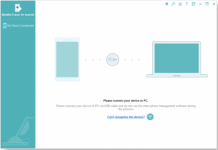
Connect Android device to PC: Connect your Android device to the PC via USB or Wi-Fi.
Select an erasing level: Choose your preferred erasing level: Low, Medium, or High.
Start to erase the device: Click "Erase" to initiate the erasure process.
Differences Between Factory Reset and Eraser for Android
A factory reset aims to restore a smartphone to factory settings, erasing user data, settings, and apps. However, it often fails to securely wipe all data, leaving information accessible on around 40% of phones sold secondhand.
Enter the professional Android data eraser - a powerful tool that permanently wipes everything on the phone. It overwrites privacy with random data, ensuring irrecoverability.
Release Name: MobiKin Eraser for Android 5.0.25
Size: 20.5 MB
l
You do not have permission to view the full content of this post. Log in or register now.
You do not have permission to view the full content of this post. Log in or register now.
You do not have permission to view the full content of this post. Log in or register now.
Mobikin Eraser For Android 5.0.25