 PH
PH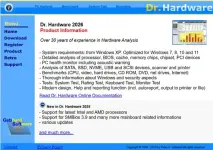
Dr.Hardware 2026 v26.7 | 4.8 Mb
Dr.Hardware is a PC analysis and diagnostic utility designed to provide detailed information about computer hardware components, system configuration, and device performance. It helps users inspect their computer environment, monitor hardware conditions, and evaluate system capabilities through integrated analysis and benchmark tools.
The software is suitable for home users, technicians, and professionals who need accurate hardware details for troubleshooting, maintenance, and system evaluation. It provides information about processors, memory, storage devices, connected peripherals, Windows configuration, and security-related aspects.
Dr.Hardware combines hardware detection, monitoring functions, and testing features in a single application. Its diagnostic tools help users understand their PC configuration and perform various checks related to performance, compatibility, and device operation.
Software Overview
Dr.Hardware provides a detailed analysis of PC components and operating system information. The application can examine processor details, BIOS information, system buses, memory modules, chipsets, PCI devices, and other hardware elements.
The software includes temperature monitoring with optional acoustic warnings to help users track hardware conditions. It can also analyze storage drives, optical devices, USB hardware, scanners, printers, and other connected components.
In addition to system information, Dr.Hardware offers benchmark tests for CPU performance, graphics, hard drives, DVD drives, network connections, and internet performance. It also includes Windows information, security details, and Windows 11 compatibility checking.
Key Features
- Analyze processor, BIOS, bus, memory, chipset, and PCI devices.
- Monitor hardware temperatures with optional warning alerts.
- Detect hard drives, optical drives, USB devices, scanners, and printers.
- Perform benchmarks for CPU, graphics, storage, DVD, network, and internet connections.
- Display detailed Windows and security information.
- Check Windows 11 compatibility.
- Perform system rating tests.
- Test keyboard functionality.
- Display monitor test images.
- Perform green tests related to electrical smog and pollutants.
- Support high DPI displays.
- Generate reports with printer and file output options.
Dr.Hardware provides users with a comprehensive set of tools for examining PC hardware and system details. Its combination of component analysis, monitoring features, and benchmark capabilities makes it useful for diagnosing systems and evaluating hardware performance.
The application is suitable for users who need detailed technical information about their computers, including hardware enthusiasts, technicians, and support professionals.
System Requirements
- Windows XP, Windows 7, Windows 8, Windows 10, Windows 11
Frequently Asked Questions
What is Dr.Hardware used for?
Dr.Hardware is used to analyze computer hardware, display system information, monitor temperatures, and perform benchmark tests.
What hardware information can Dr.Hardware provide?
The software can provide details about processors, BIOS, memory, chipsets, PCI devices, storage drives, and connected peripherals.
Does Dr.Hardware include benchmark tools?
Yes. The application includes benchmark tests for CPU, graphics, hard drives, DVD drives, network connections, and internet performance.
Which Windows versions are supported?
Dr.Hardware supports Windows XP, Windows 7, Windows 8, Windows 10, and Windows 11.
Home Page
Code:
https://www.drhardware.de/- Software Name: Dr.Hardware
- Version: 2026 v26.7
- Languages: English
- License type: Full Version
- File Size: 4.8 Mb
Download ( Rapidgator )
You do not have permission to view the full content of this post. Log in or register now.
UploadCloud
DDownload
You do not have permission to view the full content of this post. Log in or register now.
FreeDL
You do not have permission to view the full content of this post. Log in or register now.