 PH
PH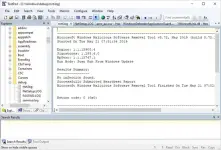
TextPad 9.9.7 (x64) Multilingual | 15.9 Mb
TextPad is a professional text editor designed for users who need more functionality than a standard text editing application while maintaining a familiar and efficient interface. It can be used for everyday text editing, document preparation, web development, and programming-related tasks.
The software provides tools for editing multiple files, managing large documents, searching and replacing text, and working with structured content. Its support for keyboard shortcuts, macros, syntax-related workflows, and external tools makes it suitable for users who regularly handle text files or source code.
TextPad is commonly used by developers, web designers, technical writers, and advanced computer users who need a lightweight editor with additional features such as file comparison, regular E×ρréššion searching, automation through macros, and customizable editing options.
Key Features:
- Edit large text files within available system memory limits.
- Support long file names, spaces in file names, and UNC network paths.
- Provide a multilingual user interface.
- Include spelling dictionaries for multiple languages.
- Edit multiple files with support for multiple views per document.
- Resume previous editing sessions with the Warm Start feature.
- Support advanced text operations including case conversion, block indentation, and text transformation.
- Automatically wrap text and manage paragraph formatting.
- Enable drag-and-drop editing between documents.
- Provide unlimited undo and redo operations.
- Support block or column text selection with visible tabs and spaces.
- Record and use keyboard macros for repetitive tasks.
- Sort text using multiple sorting keys.
- Provide automatic alignment and indentation assistance.
- Include context menus and customizable interface options.
- Search and replace text using UNIX-style regular E×ρréššions.
- Search through directory trees and replace text across multiple documents.
- Create bookmarks for lines and search results.
- Include a built-in file manager for common file operations.
- Preview and print documents with customizable layouts.
- View binary files using hexadecimal display mode.
- Compare files with the integrated comparison utility.
- Connect with external tools through user-defined commands and macros.
Why Choose TextPad:
TextPad provides a practical editing environment for users who need advanced text handling features without the complexity of a full development environment. Its combination of document editing tools, automation options, and search capabilities makes it useful for programming, web editing, and technical documentation.
The application is suitable for users who frequently work with text-based files and require additional control over editing, organization, and file management tasks.
System Requirements:
Windows compatible PC with a Pentium 4 processor supporting SSE2 instructions (first introduced in 2001).
TextPad 8 runs on Vista, Windows 7, 8.1 and 10, and on Server 2008 and 2012.
FAQ:
What is TextPad used for?
TextPad is used for editing text documents, source files, web pages, and other text-based content with advanced editing features.
Can TextPad edit multiple files at the same time?
Yes. TextPad supports editing multiple files simultaneously and provides multiple views for documents.
Does TextPad support programming tasks?
Yes. The software can be used for programming-related work through features such as macros, search tools, external commands, and text management functions.
Does TextPad support large files?
Yes. TextPad can edit large files within the limits of available virtual memory.
Home Page
Code:
https://www.textpad.com/
Download ( Rapidgator )
You do not have permission to view the full content of this post. Log in or register now.
UploadCloud
DDownload
You do not have permission to view the full content of this post. Log in or register now.
FreeDL
You do not have permission to view the full content of this post. Log in or register now.