 PH
PH-
Welcome to PHCorner Forums! Sign up for free to unlock full access and exclusive privileges, including:
- Asking questions about computer and mobile issues
- Discovering internet tips for your mobile network and computer
You are using an out of date browser. It may not display this or other websites correctly.
You should upgrade or use an alternative browser.
You should upgrade or use an alternative browser.
❓ Help React before showing download link
- Thread starter iShadow
- Start date
Heto, TS. Punta ka sa forum section kung saan mo gustong mag-post ng thread. Click mo yung "Post a thread" box sa upper right hand corner nung forum page, i-type mo yung title ng thread mo. Next, gawin mo na yung laman ng thread mo.
Yung mga items na gusto mong i-hide para sa reaction, like site links, o kung mayroong pictures or document na gusto mong isama sa thread, click mo yung item no. 1 sa picture tapos click mo yung item no. 4. Itype mo na yung mga links or kung attachment naman, click mo yung "File" box sa ibaba ng page at i-browse kung nasaan yung mga files, then insert and post.
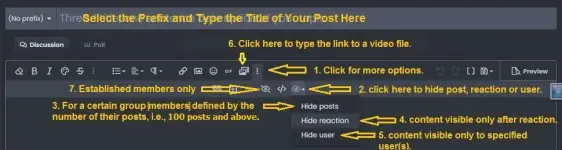
Yung mga items na gusto mong i-hide para sa reaction, like site links, o kung mayroong pictures or document na gusto mong isama sa thread, click mo yung item no. 1 sa picture tapos click mo yung item no. 4. Itype mo na yung mga links or kung attachment naman, click mo yung "File" box sa ibaba ng page at i-browse kung nasaan yung mga files, then insert and post.
Walang anuman, TS.Thank you po sa tutorial.
Flashaaaaaaa
Enthusiast
Thank you dito idol!Heto, TS. Punta ka sa forum section kung saan mo gustong mag-post ng thread. Click mo yung "Post a thread" box sa upper right hand corner nung forum page, i-type mo yung title ng thread mo. Next, gawin mo na yung laman ng thread mo.
Yung mga items na gusto mong i-hide para sa reaction, like site links, o kung mayroong pictures or document na gusto mong isama sa thread, click mo yung item no. 1 sa picture tapos click mo yung item no. 4. Itype mo na yung mga links or kung attachment naman, click mo yung "File" box sa ibaba ng page at i-browse kung nasaan yung mga files, then insert and post.
View attachment 4244155
Thank you dito idol!
thanks dito boosing
Walang anuman, mga paps.
Similar threads
-
🌐 G·TM Update June 10 Unli Fb Bypass Promo Netmod Vpn Qr Config Download Link
- Started by GODzDOG
- Replies: 30
-
About this Thread
-
6Replies
-
149Views
-
4Participants
Last reply from:
Pen_J
Pen_J
New Topics
-
Pinduoduo safe ba??
- Started by Sakuragiii
- Replies: 4
- 💬 Chitchat
-
Songhub pihingi Po salamat
- Started by bondying4
- Replies: 2
- 💬 Chitchat
-
VITAMINS PO YAN HAHAHA
- Started by Pghusmith
- Replies: 1
- 💬 Chitchat
-
GTA5 for windows 7
- Started by forty08
- Replies: 0
- 💬 Chitchat
-
Patulong po problema sa tiktok
- Started by Doma143
- Replies: 0
- 💬 Chitchat
-
Newbie at PHCorner
- Started by Moon
- Replies: 0
- 💬 Chitchat
-
CargoBoss Legit Ba ito China to Philippines Importation
- Started by Solo21
- Replies: 0
- 💬 Chitchat
-
About sa edu mail lang po
- Started by MrFuji
- Replies: 1
- 💬 Chitchat
-
SCAMMER ALERT GUYS!!!
- Started by Ms QuetzalcoatL
- Replies: 14
- 💬 Chitchat
-
Can someane help me
- Started by macmac05
- Replies: 0
- 💬 Chitchat
Trending Topics
Online now
- Members online
- 699
- Guests online
- 9,605
- Total visitors
- 10,304