 PH
PH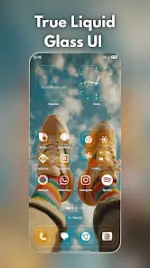
Liquid Launcher: Glass UI v1.2
Technical & Compatibility Specifications
| Attribute | Detail |
|---|---|
| Android Version | 8.0 and up |
| Status | Premium [ρáíd, Patched] |
| Architecture | Universal (None specified) |
| Languages | Multi-Language support |
| Modifications | All debug codes removed; useless files cleaned; original package signature changed |
| Requirements | No root, Lucky Patcher, or Modded Google Play required |
| Advertisements | Includes credit advertisement |
Key Features
Core Design & Personalization
- Liquid Glass UI: Features real-time glass blur, soft refraction, depth highlights, and a unified rounded "squircle" shape system.
- Themes: Light, Dark, and Auto themes with Material You accent color support.
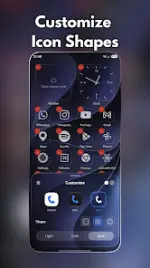
- Icon Customization: Built-in themes including Default, Clear (glass), and Dark, alongside adjustable glass highlights, motion, and labels.
- Home Screen Layout: Multi-page home screen with a glass dock, drag-and-drop folders (including 2x2 large folders), and automatic gap filling.
Navigation & Interface
- App Library: Organizes apps with automated suggestions and an A-Z indexed view.
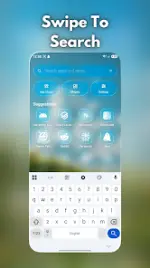
- Universal Search: Single-swipe access to local apps and web search.
- System Widgets: Analog Clock, Weather, Battery, Calendar, Reminders, and Quick Actions (flashlight, camera, phone, settings).
Gestures & Accessibility
- Supported Input: Swipe down, swipe up, double tap, and edge swipes.
- Action Mapping: Gestures can map to Search, App Library, Notifications, Lock screen, or Recent apps.
- Accessibility Service API Disclosure: Used optionally and strictly for executing user-initiated gesture shortcuts (locking the screen, opening notifications, opening recent apps). It operates entirely offline without reading, monitoring, or collecting screen content.
Performance & Privacy
- Optimization: Includes a lightweight effects mode for lower-spec hardware, a reduce-motion toggle, and battery-saver awareness.
- Data Privacy: Zero tracking, no account registration required, and zero telemetry collection. Optional permissions (calendar, gestures) function strictly on-demand.
What's New (v1.2)
- Interactive Liquid Glass: Added responsive touch feedback profiles.
- Glass Quality Profiles: Toggleable presets (Full, Lite, and Minimal) to balance visual fidelity and hardware performance.
- Layout Engine: Auto-fill gaps functionality for structured home screen organization.
- Animations: Refined transitions for the App Library and Universal Search.
- Stability: General performance optimization and bug fixes.

.webp "(ditto) :(ditto):")
