 PH
PHHi guys, Share ko lang sa mga hndi pa nakaka alam method ko para magamit yung hiTV na walang ads no premium needed
First you have to set up your private dns
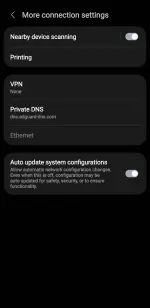
Here is a step-by-step guide on how to set it up:
Step 1: Set up a Private DNS on your device
Go to your phone's Settings > Connection & Sharing (or Network & Internet).
Look for Private DNS and select Private DNS Provider Hostname.
Enter the following hostname: dns.adguard-dns.com
Save the settings ️
️
After that you can now install the HiTv or moviebox HD directly to playstore (natry kona rin to dati sa loklok working din pero mas prefer ko hitv)
Pag meron na kayo app sundin niyo nalang yung step sa video na to:
You do not have permission to view the full content of this post. Log in or register now.
First you have to set up your private dns
Here is a step-by-step guide on how to set it up:
Step 1: Set up a Private DNS on your device
Go to your phone's Settings > Connection & Sharing (or Network & Internet).
Look for Private DNS and select Private DNS Provider Hostname.
Enter the following hostname: dns.adguard-dns.com
Save the settings
️After that you can now install the HiTv or moviebox HD directly to playstore (natry kona rin to dati sa loklok working din pero mas prefer ko hitv)
Pag meron na kayo app sundin niyo nalang yung step sa video na to:
You do not have permission to view the full content of this post. Log in or register now.
P.s make sure na bago niyo open yung app off niyo muna wifi niyo then kunting scroll sa app tas pwede niyo buksan yung wifi niyo