 PH
PH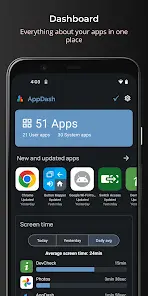
AppDash: Advanced App Manager & Backup
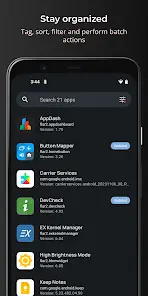
AppDash is an advanced central management tool for Android designed to organize, inspect, back up, and track applications. It integrates deep app insights, permission analysis, usage tracking, and backup capabilities into a single interface, with extended functionality available via Root or Shizuku.Technical Specifications
| Requirement / Detail | Specification |
|---|---|
| Android Version | 8.1+ |
| Architecture | arm7 + arm64 |
| File Size | 13.9 MB |
| SHA-256 Hash | 236d9759e5b76f75ea37e2f5a0ab5b5cef5f79a015f1b16bce9820f12658483c |
| Current Version | v3.06 b306 [Premium] |
| Privacy Status | Ad-free, no personally identifiable data collection |
Core Features
Organization & Management
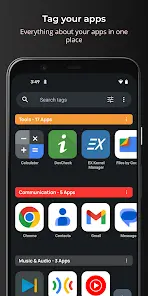
- Custom Tagging: Group and color-code applications.
- Advanced Filtering: Search, sort, and filter installed apps, or view by developer.
- Metadata Customization: Add personal notes and ratings to individual apps.
- App Lists: Create and export shareable lists of applications.
Insights & Usage Tracking
- Dashboard Analytics: Identify unused apps, large files, and recently updated software.
- Activity Monitoring: Track screen time, app launches, and full history (installs, updates, uninstalls, reinstalls, and version changes).
- Permission Summaries: Categorize permissions into high-risk, medium-risk, and special access definitions.
Deep Inspection & APK Tools
- Component Viewer: Inspect manifest data, app components, certificates, and installer details.
- Package Analysis: Analyze, extract, share, or install APK, APKS, XAPK, and APKM files directly.
- System Integration: "Open with AppDash" context menu option in native file explorers to inspect packages before installation.
Backup & Restore
- Storage Targets: Save backups to internal storage, Google Drive, or SMB shares.
- Automation: Schedule automatic backups triggered by app updates, maintaining versioned histories.
- Root Permissions: Non-root users can back up APK files. Root users gain authorization to back up app data, external data, and OBB files.
Market Tracking & Widgets
- Play Store Watchlist: Follow price drops, sales, and version updates with filtered search capabilities.
- Home Screen Widgets: Deploy dedicated widgets for screen time, recent activity, pending updates, and custom tags.
Version History & Changelogs
v3.04
- Added Task Manager: Displays running apps, active services, CPU utilization, and memory usage (requires Shizuku).
- General bug fixes and performance optimizations.
v3.03
- Added App Insights: Quick overviews for pending updates, large apps, running services, high-risk permissions, and price changes.
- Added Watchlist & Search: Dedicated engine to track price drops, sales, and updates for specific apps and developers.
- Added Battery Optimization List: Includes native toggle switches for Root/Shizuku users.
- UI improvements and updated translations.