 PH
PH

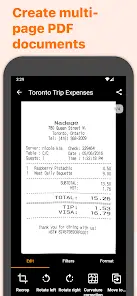
Genius Scan (Premium / Modified)
An informative overview of Genius Scan, a mobile document scanning application designed to replace desktop scanners by automatically detecting, cropping, and cleaning paper documents.Application Specifications
| Attribute | Specification |
|---|---|
| OS Requirement | Android 8.0+ |
| Architectures | arm64-v8a, armeabi-v7a |
| Screen DPIs | 160dpi, 240dpi, 320dpi, 480dpi, 640dpi |
| Languages | Full Multi Languages |
| Modification Details | Premium features activated; debug info removed; on-device processing enabled. |
Core Feature Breakdown
1. Smart Scanning & Image Processing
- Automated Detection: Recognizes paper documents against backgrounds, applies automatic cropping, and removes distortions.
- Image Clean-up: Eliminates shadows and defects from the final output.
- Enhancement Filters: Includes Black & White, Whiteboard, and Photo modes.
- Batch Scanning: Allows rapid scanning of multiple pages in sequence.
2. PDF Creation & Document Editing
- Multi-Page Compilation: Automatically combines consecutive scans into a single multi-page PDF document.
- File Manipulation: Supports document merging and splitting.
- Import Capabilities: Import existing photos and PDF files into the editor.
3. Security & Privacy
- Local Processing: Document processing occurs directly on-device.
- Access Control: Biometric unlock integration.
- Encryption: Password protection for PDF exports.
4. Organization & Search
- Management Tools: Document tagging and customizable smart renaming templates.
- Search Functions: Metadata and full-content search capabilities.
- Synchronization: Multi-device synchronization and backup via Genius Cloud.
5. Optical Character Recognition (OCR)
- Text Extraction: Pulls raw text from scanned documents.
- Searchable PDFs: Generates PDFs with searchable text layers.
- Business Card Scanner: Extracts contact information directly from scanned business cards.
6. Export Destinative Ecosystem
- Direct Sharing: Email export and automatic background auto-export capabilities.
- Cloud Storage Integration: Box, Dropbox, Evernote, Expensify, Google Drive, OneDrive, FTP, and WebDAV (including Citrix ShareFile, NextCloud, ownCloud, Synology, Yandex).
Version Updates
- Account Sync: The account's email address now automatically refreshes if modified on a separate linked device.