 PH
PH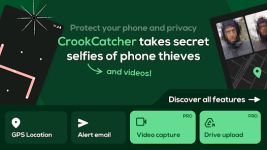
CrookCatcher • Who Touched? v3.0.23 [Premium]
CrookCatcher is a mobile security application designed to capture photographic and video evidence of unauthorized unlock attempts. When an incorrect password, PIN, or pattern is entered, the app logs the event and transmits the data via email.Specifications & Mod Info
| Requirement / Component | Details |
|---|---|
| Android OS Version | 8.0 and up |
| Current Version | v3.0.23 |
| License Type | Premium / Pro Features Unlocked |
| Modifications | Debug code removed; unnecessary files deleted; default .source Java tags removed |
| System Permissions Used | Device Administrator (monitor unlock attempts); Accessibility (lock screen element blocking) |
Core Features
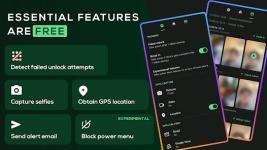
- Intruder Capture: Automatically takes photos using the front-facing camera upon failed unlock attempts.
- Location Tracking: Detects GPS coordinates and estimates the address of the device during the incident.
- Email Alerts: Dispatches immediate notification emails containing the captured intruder photos and location data.
- Resource Management: Operates in an inactive state until a failed unlock attempt occurs, minimizing battery consumption.
Premium Features
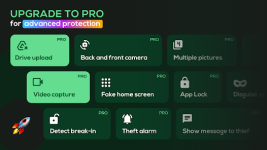
- Video Recording: Captures video clips with audio to provide additional context and evidence.
- Dual Camera Support: Utilizes the rear camera to capture environmental details.
- Cloud Integration: Automatically uploads captured media to Google Drive.
- Thief Deterrents & Deception: Displays a fake home screen, shows custom lock screen messages, and blocks access to the power menu, quick settings, and notification shade on the lock screen.
- s†éálth & Security: Disguises the app icon and name, suppresses system notifications, customizes email subjects, and protects app access with a pattern code.
- Break-in Detection: Captures a photo if a correct password is entered immediately following consecutive failed attempts.
Technical Notes & Limitations
Main link: Download Mirror link1: Download
- Reboot Requirement: The device must be unlocked manually at least once after a reboot to reactivate the application.
- Hardware Incompatibility: The application does not support devices with motorized pop-up cameras and does not trigger on fingerprint authentication errors.
- OS Behavior: On Android 13 and above, a native system notification will display when the camera is actively in use.
- Feature Stability: The shutdown prevention feature utilizes accessibility permissions and is classified as experimental, meaning compatibility varies by device.

.webp "(ditto) :(ditto):")
