 PH
PH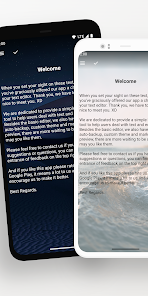
Application Overview
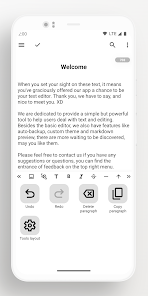
Lite Writer is a lightweight text editor designed for authors, novelists, and note-taking. It features a folder-file structure for manuscript organization, local and cloud backup systems, and comprehensive text-tracking tools.Specifications & Mod Information
| Detail | Specification |
|---|---|
| App Name | Lite Writer: Writing/Note/Memo |
| Version | v1.104.4 |
| OS Requirement | Android 6.0 and up |
| Architecture | Universal CPU |
| Modification Type | Pro / Premium Features Unlocked |
| Modder Credit | TRUMods |
| Code Cleanup | Debug codes and redundant files removed |
Core Features
File Management & Bookshelf
- Structure: Folder-file hierarchy for document organization.
- Automation: Intelligent chapter number recognition and sorting.
- Management: Streamlined bulk operations and customizable book covers.
- PC Integration: Supports mapping the home folder to a PC for desktop editing.
Inspiration & Note Capturing
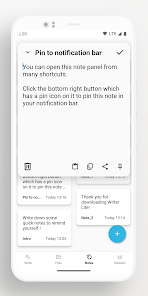
- Quick Access: Shortcut-activated quick note panel.
- Reminders: Ability to pin notes directly to the notification bar.
Text Tracking
- Metrics: Real-time character and word count monitoring.
- Analytics: 7-day word count trend tracking.
- Interface: Floating widget for instant counts; full support for CJK (Chinese, Japanese, Korean) characters.
Customization & Themes
- Display Modes: Pure white, pure black, and night-friendly dark modes.
- Visuals: Selection of built-in themes and support for importing custom wallpapers.
Backup & Data Recovery
- Cloud Sync: Auto-backup integration with Google Drive and WebDAV.
- Local Storage: Custom local backup folders, history records, and a recycle bin.
- Data Portability: Single-click data export.
Security & Privacy
- Access Control: App locking via fingerprint or pattern recognition.
- Automated Protection: Automatic locking when idle; blurred app screenshots in the recent tasks view.
What's New (v1.104.4)
- Editor Enhancements: Added customizable cursor colors and an outline jumping tool.
- Cloud Backups: Added support for using custom email addresses as cloud backup services.
- System Integration: Added "Import Note" functionality via the system sharing menu.
- Visuals: Added additional colorful themes.
- Performance: General stability improvements.