 PH
PHdiscuss3387
Established

Description
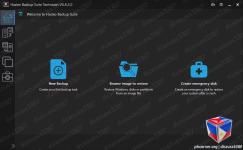
Hasleo Backup Suite is a Windows backup and restore software, which embeds backup, restore and cloning features, it is designed for Windows operating system users and can be used on both Windows PCs and Servers.
The backup and restore feature of Hasleo Backup Suite can help you back up and restore the Windows operating systems, disks and partitions to protect the security of your Windows operating system and personal data. The cloning feature of Hasleo Backup Suite can help you migrate Windows to another disk, or easily upgrade a disk to SSD or a larger capacity disk.
As a professional backup and restore software, the bootable Windows PE emergency disk can help you quickly and effectively restore the Windows operating system to a healthy state after a disaster strikes, such as system crash or disk corruption.
This application comes with a straightforward appearance that makes it easy even for those with little PC skills to choose the operation they want to initiate. You can either backup the currently running Windows to an image file or an entire disk or partition.
Regardless of the one you need, you can specify customize a flurry of details related to it, such as compression level, protect it with a password, define the notification SMTP server and target email addresses. You can even choose pre- and post-commands.
Restoring a previously created task can be managed just as easily, even if you are not a tech-savvy user.
Hasleo Backup Suite can also be used to clone the currently running OS to another disk, to clone one disk to another one, as well as clone a partition to a different location.
You need to select the source and the target locations, then you can define the new partition size, specify its alignment (1M, Cylinder, 4K or none) and activate sector by sector clone.
When using Hasleo Backup Suite, you get the possibility to rebuild the MBR, wipe a drive or add a boot menu. If you are interested in creating an emergency disk, you can save it to your connected USB device or export it as an ISO file and burn it on a disc later on.
Buy Premium Account From My Download Links & Get Fastest Speed.
Details
- File Size: 809 MB
Download Links
You do not have permission to view the full content of this post. Log in or register now.
You do not have permission to view the full content of this post. Log in or register now.