 PH
PHPara sa mga Private RF Online Players (newbie)
Ito "ISA" sa mga ginagamit nila, afk tab target selection.
First check the Private Server has "TAB target option"
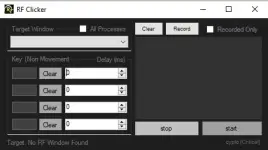
Paano:
1. Open Private RF online
2. Click the scroll in Target Window, you select the running RF Online.
3. Click the first Rectangle Area, use "ctrl + Tab", here you can see the letter "TAB".
4. Next to it put the delay time to 100.
5. For the AFK attack, click the second rectangle, put it to "Space" and put the delay to 100 or 300"
6. The you can go AFK!! Happy Grind!!
DOWNLOAD HERE!
Download
Ito "ISA" sa mga ginagamit nila, afk tab target selection.
First check the Private Server has "TAB target option"
Paano:
1. Open Private RF online
2. Click the scroll in Target Window, you select the running RF Online.
3. Click the first Rectangle Area, use "ctrl + Tab", here you can see the letter "TAB".
4. Next to it put the delay time to 100.
5. For the AFK attack, click the second rectangle, put it to "Space" and put the delay to 100 or 300"
6. The you can go AFK!! Happy Grind!!
DOWNLOAD HERE!
Download