 PH
PH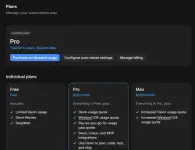 Share lang for those na gustong i-try yung Devin + Windsurf setup.
Sign up lang sa Devin:
You do not have permission to view the full content of this post. Log in or register now.
Then punta sa Plans and choose Pro Trial. May 14 days trial siya, good for testing or help sa pang coding/vibe coding mo hehe. ;p
After ma-activate, download naman ng Windsurf:
You do not have permission to view the full content of this post. Log in or register now.
Log in using the Devin account. Once connected, pwede na gamitin sa Windsurf yung available AI models like Claude Opus, Sonnet, Kimi, GPT-5, Gemini Pro, and other supported models depending sa account access.
Mas recommended gamitin sa Windsurf app mismo instead na sa Devin web app, especially kung coding workflow ang gagawin. Mas smooth and mas practical siya gamitin doon.
Few reminders lang:
Use a secondary email or try temp mail, para hindi ma-mix sa main email. Use a valid payment method since trial with auto-renewal ito.
Naglo-lock ng account si Devin.AI so set din ng phone reminder before day 14 para hindi makalimutan i-cancel kung hindi itutuloy yung ρáíd plan.
Auto-renew siya after trial period, so better to check the billing/cancellation settings early para iwas unexpected charge or account issue.