 PH
PH

Application Overview
A high-speed QR and barcode scanner designed for Android devices, supporting automatic recognition, scanning, and decoding across all standard code formats without requiring manual adjustment or internet connectivity.Technical Specifications
| Property | Details |
|---|---|
| OS Requirement | Android 5.0 and up |
| Version | v2.4.7 (Pro / Premium) |
| Permissions | Camera only (Privacy safe) |
| Mod Features | Pro/ρáíd features unlocked; All debug info removed; Modded by Mixroot |
| Changelog | No changelog provided |
Supported Formats
- QR Code
- Data Matrix
- Maxi code
- Code 39
- Code 93
- Codabar
- UPC-A
- EAN-8
- (Supports all other standard QR & barcode formats)
Core Features
- Instant Auto-Detection: Automatically recognizes, scans, and decodes data upon opening the app. No manual button presses required.
- Auto Zoom: Automatically adjusts focus and zoom to read small or distant QR codes and barcodes.
- Price Scanner: Utility to scan product barcodes and compare retail pricing online.
- Local Scan History: Automatically saves all scan history for offline viewing and retrieval.
- Gallery Scanning: Supports importing and scanning QR codes and barcodes directly from the device image gallery.
- Hardware Integration: Integrated flashlight support for scanning in low-light environments.
- Data Creation: Includes functionality to generate custom QR codes.
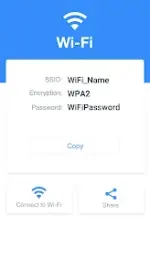
- Data Contextualization: Decodes data types including contacts, products, URLs, Wi-Fi networks (direct connection without password entry), text, books/school books, emails, locations, calendars, and coupon codes.
Operation Workflow
- Open the application.
- Align the camera view with the QR code or barcode.
- The app auto-detects, zooms, and decodes the target.
- View results along with context-specific action options (e.g., browsing websites, connecting to Wi-Fi, or searching products online).