 PH
PH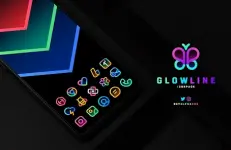
GlowLine Icon Pack v4.5 [Patched]
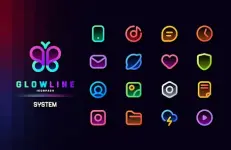
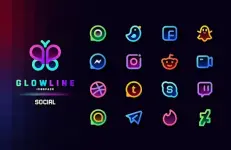
GlowLine is a linear icon pack featuring colorful glowing details designed for both light and dark/AMOLED setups. The design adheres to Google's Material Design guidelines for sizing and dimensions.Technical Details
| Feature | Specification |
|---|---|
| Current Version | v4.5 [Patched] / Premium |
| Android Compatibility | 5.0 and up |
| Total Icons | 4000+ (2100+ base icons, updated in recent builds) |
| Wallpaper Support | Cloud-based matching collection, Muzei Live Wallpaper support |
| System Features | Dynamic Calendar, custom folder icons, app drawer icons, icon preview, search |
Key Features
- Design: Minimal, colorful, linear icons with internal glow effects.
- Icon Requests: Server-based icon request system accessible within the app dashboard.
- Updates: Frequent updates covering new icons and modified app activities.
- Alternatives: Alternative icon choices provided for popular and system applications.
- Dashboard: Slick Material Design interface.
Compatibility & Launcher Support
A supported launcher is required to apply this icon pack. Stock launchers for Oxygen OS and Mi Poco support icon packs natively, but Google Now Launcher and One UI do not.| Directly Supported via Apply Section | Supported via Launcher/Theme Settings Only |
|---|---|
| Nova Launcher (Recommended) | Arrow Launcher |
| Lawnchair (Recommended) | ASAP Launcher |
| Action Launcher | Cobo Launcher |
| ADW Launcher | Line Launcher |
| Apex Launcher | Mesh Launcher |
| Atom Launcher | Peek Launcher |
| Aviate Launcher | Z Launcher |
| CM Theme Engine | Launch by Quixey Launcher |
| GO Launcher | iTop Launcher |
| Holo Launcher / Holo Launcher HD | KK Launcher |
| LG Home | MN Launcher |
| Lucid Launcher | New Launcher |
| M Launcher | S Launcher |
| Mini Launcher | Open Launcher |
| Next Launcher | Flick Launcher |
| Nougat Launcher | |
| Smart Launcher | |
| Solo Launcher | |
| V Launcher | |
| ZenUI Launcher | |
| Zero Launcher | |
| ABC Launcher | |
| Evie Launcher |
Installation
- Install a supported theme launcher (e.g., Nova Launcher or Lawnchair).
- Open GlowLine Icon Pack and select Apply.
- Alternatively, if the launcher is not listed in the dashboard, apply the icon pack directly through the launcher's theme settings menu.
Changelog (v4.5)
- Added 50+ new icons (bringing the total to over 4000+).
- Updated several existing icons.
- Added and updated app activities.