 PH
PH

App Overview: EasyCut Video Editor
EasyCut is a mobile video editing, photo editing, and collage application designed for multi-purpose media creation, including vlogs, Reels, and short-form video content.Technical Specifications & Mod Details
| Specification | Details |
|---|---|
| OS Requirement | Android 6.0 and up |
| Mod Features | VIP Features Unlocked |
| Supported CPUs | arm64-v8a, armeabi-v7a |
| Supported Languages | es, fa, hi, in, ja, km, ko, ms, ru, th, tl, uk, vi, zh, zh-CN, zh-TW |
| Additional Info | Debug Info Removed |
Key Features
- Video Editing & Timeline Management: Supports trimming, cropping, splitting, and merging of video clips. Features a drag-and-drop interface for arranging video, audio, and photos.
- Photo Editing: Built-in photo editing tool for basic adjustments and profile picture creation.
- Collage Maker: Supports grid layouts utilizing 1 to 9 images with customizable gap spacing, corner rounding, and background colors.
- Effects & Filters: Includes video transition effects and trending filters.
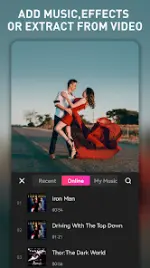
- Audio Integration: Built-in music library supporting background audio tracks, voice-overs, and audio extraction from existing video files.
- Canvas & Background Adjustment: Modifiable aspect ratios and adjustable borders/background formats for specific social media platforms.
- Titles & Graphics: Animated graphics, text overlays, stickers, and customizable font families with adjustable sizing and coloring.
- Video Compression: Compresses large video files to reduce local storage footprints.
- Speed Control: Adjustable playback speeds supporting speed up, slow down, and rewinding capabilities.
- Export Options: Supports Full HD video rendering and exporting.
What's New
- Added updated video templates.
- Expanded sticker collection.