 PH
PHDeleted_2502627
Forum Veteran
I always turn this off sa settings ko kasi I want a cleaner look at for my privacy na rin.
Somehow okay lang sa ibang tao naka-on 'to. I remembered noong may zoom meeting ako ina-attendan and this other participant was sharing their screen, noong icclose niya na yung Edge nagright click siya sa icon ng edge browser sa may taskbar tapos nareveal yung list ng top sites niya and halos puro powrn site nandon. Nakakahiya diba.
I am referring to this:
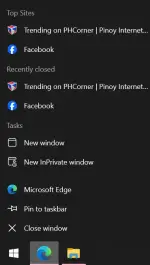
This is called Jump List madali lang siya i-off assuming you're using Windows din.
Sa Settings > Personalization > Turn of Show recently opened items in Jump Lists on blah blah blah. Just see image below.

Wala na ring kalat sa Quick Access sa File Explorer after mo iturn off ito. Pansin niyo yung unorganized folders and files na kapag inoopen mo automatic nakalagay siya doon sa may recently opened items sa may quick access, to some people it might be helpful pero sa'kin clutter lang siya o pampagulo kaya okay lang naka-off sa'kin itong Jump List feature ng Windows.
