PH
PHYou do not have permission to view the full content of this post.
Log in or register now.
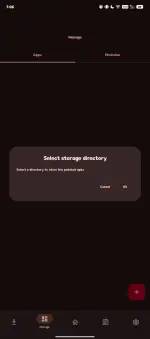
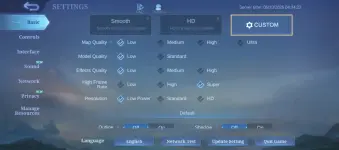
In this video. I'll show you how to unlock Ultra Refresh Rate on MLBB 2026 without root or without any Cloning apps like Meta Wolf. Unlock the ultra refresh rate on the mlbb app itself.
Sorry for my bad editing skills.
Tested on Android 13 might work as well on lower version . Not sure with Android 14 above .
This trick works like ones on rooted device . Just like the Magisk or Xposed Manager. But this time , we will make it work to our non rooted device. Be sure to follow the video carefully.
Tips: You can also make backup data of your MLBB app first so that you only need to copy resources back after the ρá†ch using any file manager that can access or Read/Write on Android/Data folder. ( Ex: Zarchiever )
Files will be needed:
LS ρá†ch
You do not have permission to view the full content of this post. Log in or register now.
Game Unlocker
You do not have permission to view the full content of this post. Log in or register now.
After all those ρá†ch . You can disable back your developer option . And hide those Shizuku and LSPatch app. Even this two apps not running , it will remain unlock the Ultra Refresh Rate.
Note: DO NOT UNINSTALL LSPATCH & GameUnlocker
It will make MLBB app crash or unresponsive ( That's because I did tried to uninstall it too haha )
)
Also don't worry about being banned , it is safe to use since it only spoof the device info . Just like Meta Wolf do, except it's implemented on the actual mlbb app.
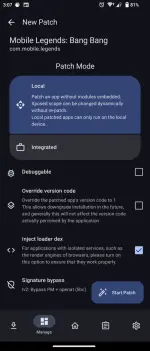
for those who experienced bug sa mic or voice chat during in match . just redo the ρá†ch then check "inject loader dex"
just found out recently , di ko nalaman agad since most of the time solo player lang po ako.
Hope this video helps you. Simple Like and Subscribe will make me inspire to make more tutorial
Someone may copy it with better editing skills . It's fine.
Still Big thanks to those developer out there who make this video possible
In this video. I'll show you how to unlock Ultra Refresh Rate on MLBB 2026 without root or without any Cloning apps like Meta Wolf. Unlock the ultra refresh rate on the mlbb app itself.
Sorry for my bad editing skills.
Tested on Android 13 might work as well on lower version . Not sure with Android 14 above .
This trick works like ones on rooted device . Just like the Magisk or Xposed Manager. But this time , we will make it work to our non rooted device. Be sure to follow the video carefully.
Tips: You can also make backup data of your MLBB app first so that you only need to copy resources back after the ρá†ch using any file manager that can access or Read/Write on Android/Data folder. ( Ex: Zarchiever )
Files will be needed:
LS ρá†ch
You do not have permission to view the full content of this post. Log in or register now.
Game Unlocker
You do not have permission to view the full content of this post. Log in or register now.
After all those ρá†ch . You can disable back your developer option . And hide those Shizuku and LSPatch app. Even this two apps not running , it will remain unlock the Ultra Refresh Rate.
Note: DO NOT UNINSTALL LSPATCH & GameUnlocker
It will make MLBB app crash or unresponsive ( That's because I did tried to uninstall it too haha
)Also don't worry about being banned , it is safe to use since it only spoof the device info . Just like Meta Wolf do, except it's implemented on the actual mlbb app.
for those who experienced bug sa mic or voice chat during in match . just redo the ρá†ch then check "inject loader dex"
just found out recently , di ko nalaman agad since most of the time solo player lang po ako.
Hope this video helps you. Simple Like and Subscribe will make me inspire to make more tutorial
Someone may copy it with better editing skills . It's fine.
Still Big thanks to those developer out there who make this video possible