PH
PHWant to remove the AT&T carrier lock from your iPhone? Follow this simple step-by-step tutorial using GSMPhil.
 Step 1 — Check the Carrier First
Before requesting an unlock, make sure your iPhone is actually locked to AT&T.Go to:
You do not have permission to view the full content of this post. Log in or register now.
Run a carrier check to confirm the current network lock status of your device.

Step 2 — Go to the Unlock Page
After confirming the carrier, proceed to:You do not have permission to view the full content of this post. Log in or register now.
Search for the correct AT&T unlock service.
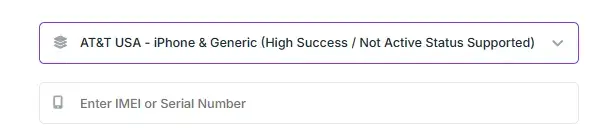
 Can’t find your carrier or service?
Click “Message us for suggestions” and send them an inquiry for assistance.
Step 3 — Enter Your IMEI Carefully
Input your iPhone’s IMEI number correctly.You can find your IMEI by:
• Dialing *#06#
• Going to Settings > General > About

 IMPORTANT:
WRONG SERIAL NUMBER / IMEI = NO REFUND
Double-check everything before submitting your order.
Step 4 — Submit the Unlock Request
Once all details are correct, submit your unlock request.Now all you need to do is wait for the result/update from the provider.

After approval, your iPhone will be ready to use with other carriers worldwide