 PH
PH

SAI (Split APKs Installer)
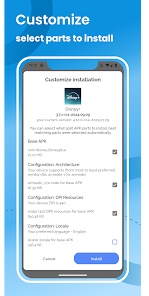
SAI is a specialized utility designed for the installation and management of various Android package formats, specifically optimized for split APKs and bundled applications.Technical Specifications
| Category | Details |
|---|---|
| Minimum OS | Android 7.0+ |
| Supported Formats | .apk, .xapk, .apkm, .apks |
| Core Functions | Installation, Backup, Management |
Key Features
- Format Compatibility
- Full support for standard APKs, XAPK, and APKM files.
- Specialized handling for split APKs and APK bundles from diverse sources.
- Capacity for large-scale application and game files.
- Backup & Restore
- Integrated Backup Manager for archiving installed applications.
- Local restoration capabilities to bypass redundant downloads.
- Application Management
- Batch installation processing to reduce deployment time.
- Tools for uninstallation, organization, and application sharing.
- System Integrity
- Validation protocols to prevent the installation of corrupted files.
- High-speed installation engine.
Usage Instructions
- Open the SAI application.
- Navigate to the file picker and select the desired archive or bundle.
- Execute the "Install" command and grant necessary system permissions.