 PH
PH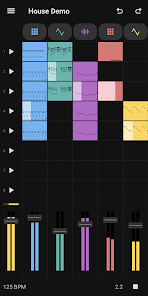
Groovebox 4 - Music Maker (v4.1.3)
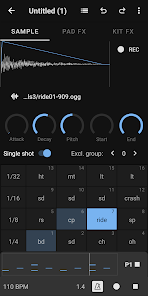
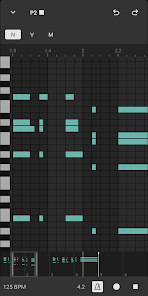
Groovebox is a mobile music production suite designed for creating beats, bass lines, and melodies through a combination of synthesizers, samplers, and drum machines. The application features a launchpad for loop triggering, a professional piano-roll, and a step sequencer for melodic and rhythmic arrangement.Technical Specifications
| Attribute | Details |
|---|---|
| Version | 4.1.3 (Build 4103) |
| Android Requirement | 8.0+ |
| Architecture | arm7 + arm64 |
| File Size | 60.5 MB |
| SHA-256 | 06ff0b1daa344c45aa79a80f9216d49710575979ca88802b1a67c3f94823f3f8 |
Key Features
Production Tools
- Instruments: Synthesizer, Sampler, and Rhythm Machine.
- Sequencing: Professional pattern editor and step sequencer with mini pattern views for rapid access.
- Performance: Launchpad for real-time loop combination and sound shaping.
- Recording: Metronome support, count-in functionality, and quantization.
Audio & Sample Management
- Library: 300+ internal drum samples.
- User Samples: Support for importing custom audio samples (WAV/OGG) and a new Melodic Sampler for instruments like piano and strings.
- Per-Pad Processing: Individual controls for Pitch, Attack, Decay, EQ, Volume, Panning, Delay, and dual Reverb units.
Project Management
- Tempo Range: 30 BPM to 400 BPM.
- Export: Audio export to .wav or .ogg formats.
- Persistence: Save/Load project files for continued editing.
Recent Updates (v4.1.3)
- UI Redesign: Modernized interface with refined navigation.
- Workflow Enhancements: Song recording mode and reworked note editors for faster performance.
- Expanded Support: User sample support added to the base version.
- System Stability: Implementation of reliable Undo/Redo functionality.
Usage Note
For optimal audio performance and minimal latency, the use of wired headphones or speakers is recommended. Bluetooth devices may introduce significant audio delay during recording and playback.Main link: Download Mirror link1: Download