 PH
PHcanitrytricks
Eternal Poster
Hello Ka PHCorner,
Dahil nawala estab status ko, i'm contributing uli ng valuable content dito sa community natin
I am sharing to you the cheapest available PH VPS na pwdi e avail sa mga ma hilig mag setup ng personal server for web hosting, VPN, etc...
Without further ado - Alibaba is giving us $9.9 dollar per year VPS po! Yes, you heard it right.
Steps #1.
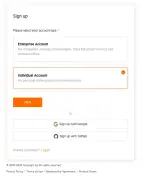
- You need to have an account sa mismong website nila. If wala pa, kindly register nlang po as "Individual Account" here You do not have permission to view the full content of this post. Log in or register now.
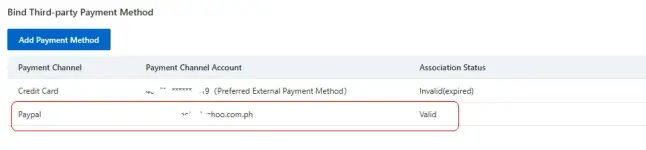
2. Add Payment Method. Syempre bibili tayo eh... -> You can use Card or Paypal po here You do not have permission to view the full content of this post. Log in or register now.
3. That's it! Proceed to avail the promo. Find the photo (as shown) from the selection here You do not have permission to view the full content of this post. Log in or register now.
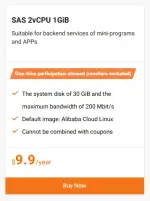
4. Click 'Buy Now' and you will be redirecting sa Setup page. Then pay attention for the following
5. Once the VPS instance is created, you will see it here You do not have permission to view the full content of this post. Log in or register now.
Hope it helps po and enjoy!
PS: Pa transfer nalang po admin to the right forum in case nagka mali ako.
Dahil nawala estab status ko, i'm contributing uli ng valuable content dito sa community natin
I am sharing to you the cheapest available PH VPS na pwdi e avail sa mga ma hilig mag setup ng personal server for web hosting, VPN, etc...
Without further ado - Alibaba is giving us $9.9 dollar per year VPS po! Yes, you heard it right.
- Philippines Location (or select other countries available)
- 2 CPU, 1GB RAM
- Unlimited bandwidth
- Up to 200 Mbps (but i'm getting 300Mbps+
 )
)
Steps #1.
- You need to have an account sa mismong website nila. If wala pa, kindly register nlang po as "Individual Account" here You do not have permission to view the full content of this post. Log in or register now.
2. Add Payment Method. Syempre bibili tayo eh... -> You can use Card or Paypal po here You do not have permission to view the full content of this post. Log in or register now.
3. That's it! Proceed to avail the promo. Find the photo (as shown) from the selection here You do not have permission to view the full content of this post. Log in or register now.
4. Click 'Buy Now' and you will be redirecting sa Setup page. Then pay attention for the following
- Region: e.g. Philippines (Manila)
- Image: e.g. Ubuntu, Debian, etc...
- Instance Plan: Make sure it defaults to the promo ($9.9/year)
- Amount Payable: Make sure the total is $9.9 before you click the "BUY NOW" button.
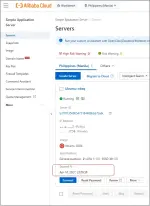
5. Once the VPS instance is created, you will see it here You do not have permission to view the full content of this post. Log in or register now.
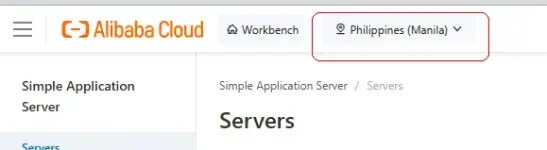
- Or, click the burger button of the site (upper left) -> Under 'Product & Service' click "All" -> Under 'Cloud Server' click "Simple Applicable Server".
- Set this area here to "Philippines" (to see PH manila VPS list) and the server details will appear at the bottom.
Hope it helps po and enjoy!
PS: Pa transfer nalang po admin to the right forum in case nagka mali ako.


 Thanks !!!