 PH
PH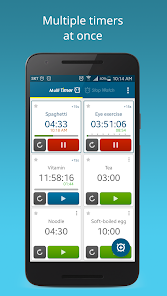
Multi Timer StopWatch
Multi Timer is a time management application designed for concurrent task tracking. It allows users to configure and execute multiple independent timers and stopwatches simultaneously across all Android device types.Technical Specifications
| Detail | Specification |
|---|---|
| Version | v2.13.49 (Build 522) |
| Android Requirement | 6.0+ |
| Status | Premium Unlocked |
| Architecture | Mod Extra (Optimized) |
Core Features
- Concurrent Timers: Set and run multiple independent timers for varied tasks (cooking, study, work, etc.).
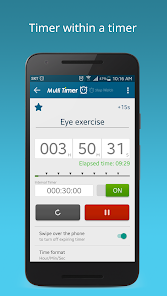
- Interval Notifications: Nested timer functionality providing alerts at specific intervals within a primary countdown.
- Audio Customization: Individual sound assignments for each timer and integrated Text-to-Speech announcements.
- Stopwatch Management: Local storage and sharing capabilities for recorded stopwatch data.
- Internal Linking: API-style support to trigger specific timer functions from external applications via saved internal links.
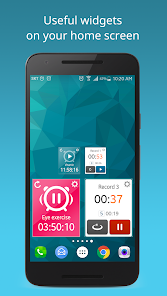
- Dynamic Widgets: Resizable home screen widgets with customizable color schemes.
System Permissions
| Permission | Purpose |
|---|---|
| Notifications | Display active timer/stopwatch status in the system tray. |
| Music and Audio | Access local media for custom alarm tones. |
| Bluetooth | Route audio output to external Bluetooth devices. |
| Phone State | Adjust alarm behavior and volume during active voice calls. |
Mod & Premium Features
- Premium Unlocked: Access to all current and future ρáíd features.
- Ad-Free Experience: Removal of all advertisement layouts, links, and SDKs (including Facebook Ads).
- Privacy & Performance:
- Disabled Analytics, Crashlytics, and Firebase tracking.
- Removed unnecessary Permissions, Receivers, Providers, and Services.
- Cleaned debug code and removed "More Apps" promotional content.
- Bypass: Verification of premium purchase status disabled.
Change Log (v2.13.49)
- Logic Correction: Resolved a bug where repeating timers failed to terminate after a manual stop or reset.
- Widget UI: Fixed a display issue where elapsed time data remained static on the widget during active alarm states.