 PH
PH
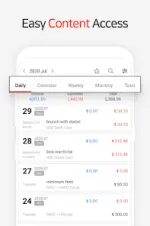
Money Manager: Financial Planning & Asset Management
Money Manager is a personal finance tool for Android that integrates expense tracking, budget planning, and double-entry bookkeeping.Technical Specifications
| Category | Details |
|---|---|
| Version | 4.10.9 GF (Build 1155) |
| Android Requirement | 6.0+ |
| Architecture | arm64-v8a, armeabi-v7a |
| Screen DPI | 120dpi, 160dpi, 240dpi, 320dpi, 480dpi, 640dpi |
| Languages | Full Multi Languages |
Core Functionality
- Double-Entry Bookkeeping: Automates asset management by reflecting deposits and withdrawals immediately upon income or expense entry.
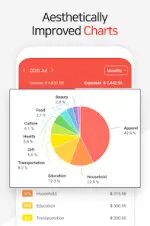
- Budgeting & Visualization: Graphical representation of expenses versus budgets for financial trend analysis.
- Card Management: Tracks settlement dates, payment amounts, and outstanding balances for credit and debit cards.
- Automated Transactions: Supports transfers between assets, direct debits, and recurring settings for salaries, insurance, and loans.
- Data Analysis: Instant statistics and monthly change tracking categorized by expense type.
- Data Portability: Features Excel backup/restore and a PC editing mode via Wi-Fi for data sorting and graph visualization.
- Security: Passcode protection for account books.
Key Features
- Bookmark Tool: Batch input for frequent expenses.
- Sub-Category Management: Ability to toggle sub-categories on or off.
- In-App Calculator: Integrated amount calculation tool.
- Customization: Configurable starting dates for accounting cycles.
Premium & Mod Features
| Feature | Specification |
|---|---|
| Ads | Removed |
| Assets | Unlimited (increased from free version limit of 15) |
| PC Editing | Enabled (Wi-Fi data management and sorting) |
| Debug Info | Stripped |
| Premium Status | Unlocked |
Version 4.10.x Changelog
- Account Exchange: Support for currency or value exchange between accounts during transfers.
- UI Enhancements: Expand/collapse functionality for account groups on the "Accounts" tab.
- Transaction Duplication: Option to use the current date or the original entry date when copying transactions.
- Media Handling: Support for attaching multiple photos simultaneously.