 PH
PH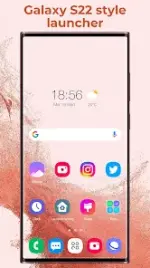
Super S22 Launcher (Galaxy S22 Style)
Super S22 Launcher is a modern interface built on the Super S9 Launcher framework, designed to replicate the Galaxy S22, S22+, and S22 Ultra experience. It is compatible with all Android 5.0+ devices.Application Specifications
| Detail | Specification |
|---|---|
| Minimum OS | Android 5.0+ |
| Current Version | v3.0 |
| Architecture | arm64-v8a, armeabi-v7a |
| Base Framework | Super S9 Launcher |
| Target Interface | One UI 3.0/4.0 Style |
Key Features
Theme and Visuals
- Iconography: Unified Galaxy S22 icon shapes; support for third-party icon packs.
- Theme Store: Access to 300+ launcher themes.
- Wallpapers: Integrated Galaxy S22 specific and online wallpaper library.
Desktop and Dock
- Layout Modes: Supports "Home screen and Drawer" or "Home screen only" configurations.
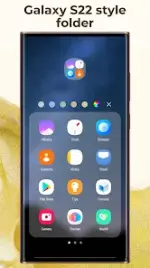
- Folder Management: Auto-classification of apps; customizable folder colors, sorting, and unique folder covers.
- Security: Desktop layout locking to prevent accidental modifications.
- Dock: Supports multiple dock pages and customizable dock backgrounds.
- Transition Effects: Various desktop transition animations.
App Drawer
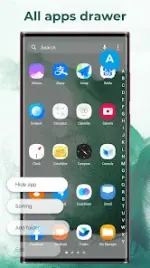
- Styles: Four available modes: Horizontal, Vertical, Vertical with Category, and List.
- Sorting: Options for A-Z, latest installed, most used, or manual sorting.
- Navigation: A-Z sidebar for rapid app location.
- Customization: Supports drawer folders and background modifications.
Functional Tools and Gestures
- Privacy: Built-in app hiding and app locking functionality.
- Gestures: Supports swipe up/down, pinch in/out, two-finger gestures, and dock icon gestures.
- Widgets: Includes analog/digital clocks, weather, photo frames, and free-style widgets.
- Sidebar: Access to system tools via a launcher sidebar.
- Notifications: Badges for missed calls, unread messages, and app-specific notifications.
Configuration Options
- Grid & Sizing: Adjustable desktop grid size, icon size, and label scaling.
- Typography: Customizable fonts and label colors.
- Spacing: Adjustable horizontal/vertical margins and widget padding.
- UI Elements: Customizable search bar, folder preview styles, and desktop indicators.
Version History
v3.0 Updates:- Redesigned settings and drawer settings pages.
- Optimized home screen UI designs.
- Improved home screen widget performance and aesthetics.
Technical Notes
- Mod Status: Premium features unlocked.
- Localization: Supports en-AU, en-CA, en-GB, en-IN, en-XC.
- Disclaimer: This is an independent project and not an official Samsung One UI product. Android is a trademark of Google, Inc. Samsung is a trademark of Samsung Electronics Co., Ltd.