 PH
PH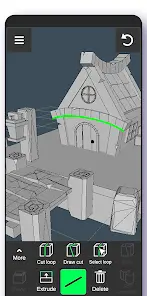
3D Modeling App: Sculpt & Draw | Version 1.20.15
3D Modeling App is a mobile CAD and CGI design suite that utilizes gesture-based controls for 3D modeling, sculpting, and game asset creation. The software supports stylus input and provides a comprehensive toolkit for industrial design, engineering, and digital art.Application Specifications
| Category | Details |
|---|---|
| Version | 1.20.15 |
| OS Requirement | Android 6.0+ |
| Architecture | armeabi-v7a, arm64-v8a |
| Supported Languages | Multi-language |
| Import/Export Format | Native .obj support |
Core Feature Set
1. Geometry Manipulation
- Vertex Tools: Target merge, collapse edges/faces, connect, and face creation.
- Edge Tools: Swipe-to-cut, point-to-point cutting, loop cutting/selection, extrusion, and ring selection.
- Face Tools: Extrusion, point-set drawing, detaching, cloning, shell selection, and face reversal.
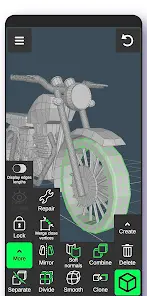
- Object Tools: Combine/separate, mirror, smooth, subdivision, and normal hardening/softening.
2. Sculpting & Painting
- Sculpting Engine: Move, screen, push, pull, and smooth brushes with adjustable size and strength.
- Coloring: Integrated vertex color painting.
- Materials: Support for up to 20 materials per object.
3. Precision & Display
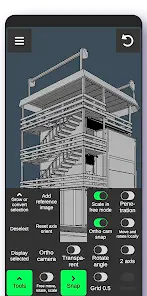
- Snapping: Grid, rotate angle, 2-axis plane, local space, physical penetration, and orthographic camera snapping.
- Visualization: Toggleable wireframes, shadows, and axes. Real-time data for triangle counts, vertex distance, and edge length.
- Camera: Orthographic and perspective views with precise value inputs for move, rotate, and scale operations.
Compatibility & Workflow
The application is designed for interoperability with professional desktop suites via .obj export.| Software Category | Compatible Applications |
|---|---|
| 3D Modeling / DCC | 3ds Max, Maya, Blender, Zbrush, Modo, Adobe Photoshop, MeshMixer, Cinema 4D |
| CAD / Engineering | AutoCAD, SolidWorks, Tinkercad, NX, Catia, Solid Edge, Fusion 360, Rhino, Onshape, Sketchup |
Mod Features
- Premium features unlocked.
- Native model import/export enabled.
- Unlimited project creation.
- All premium models unlocked.
- Ad-free experience.
- Redundant file removal for optimized performance.