 PH
PH

MacroDroid: Device Automation
MacroDroid is a task automation and configuration utility for Android. It utilizes a logical, step-by-step interface to create "Macros" consisting of specific triggers, actions, and optional constraints.Technical Specifications
| Detail | Specification |
|---|---|
| Current Version | 5.63.6 (Build 796300006) |
| Release Date | April 2026 |
| Android Requirement | 6.0+ |
| Permissions Used | BIND_DEVICE_ADMIN (for failed login triggers), Accessibility Services |
Functional Capabilities
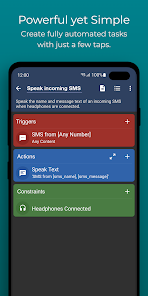
MacroDroid automates device functions by linking triggers to actions. Users can further refine these processes by applying constraints to ensure tasks only run under specific conditions.- Triggers: Battery level, app launch/close, incoming SMS, NFC tag detection, power button toggles, geofencing, and failed login attempts.
- Actions: Toggle Wi-Fi/Bluetooth, send SMS with location data, text-to-speech (time/notifications), and volume configuration.
- Constraints: Day of the week, time range, and device state.
Configuration Process
- Add Macro: Initiate the creation process.
- Select Trigger: Choose the event that initiates the macro (e.g., Battery Level < 10%).
- Select Action: Define the resulting operation (e.g., Disable Wi-Fi).
- Add Constraints: (Optional) Define conditions required for execution (e.g., Only on weekends).
- Categorize: Assign a name and category to the macro for organization.
Pro Features
The Pro version removes the limitations found in the free tier, which is restricted to five macros and includes advertisements.- Unlimited Macros: No cap on the number of automated tasks.
- Ad-Free: Removal of all third-party advertisements.
- Template Store: Access to share and download community-created macro templates.
Changelog: v5.63.6
- Variable Fix: Resolved an issue where variable names failed to update when used within action block input parameters.
- Trigger Stability: Fixed a crash occurring during geofence selection within the geofence trigger setup.
- UI/UX: Corrected various layout and interface inconsistencies.
- General Stability: Addressed several minor causes of application crashes.