 PH
PH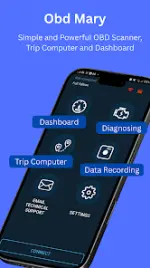
Obd Mary - Car Scanner for ELM v1.300
Obd Mary is a professional EOBD / OBD-2 diagnostic tool, gauge dashboard, and trip computer. The application facilitates communication with various vehicle Electronic Control Units (ECUs) via ELM327 adapters to monitor real-time data and manage diagnostic trouble codes.Technical Specifications
| Category | Details |
|---|---|
| Version | v1.300 (Build 300) |
| Required OS | Android 6.0+ |
| Architecture | arm64-v8a, armeabi-v7a |
| Screen DPI | 160dpi, 240dpi, 320dpi, 480dpi, 640dpi |
| Connectivity | ELM327 Bluetooth or Wi-Fi adapter (v1.5 recommended) |
| Premium Status | Activated (Ads removed, full functionality enabled) |
Core Functionalities
1. Vehicle Diagnostics (DTC Scanner)
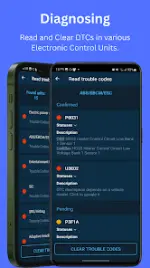
- Read/Reset Codes: Access and clear trouble codes from OBD2-compliant control units.
- Extended ECU Support: Capability to diagnose modules beyond the engine, including ABS, SRS, Airbag, and HVAC.
- Live Data: Real-time monitoring of parameters such as RPM, speed, MAF, and coolant temperature.
- Freeze-Frame: Retrieval of sensor data captured at the moment a DTC was triggered.
2. Customizable Dashboard
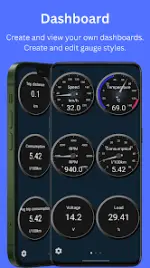
- Gauge Set: Create personalized gauge layouts with adjustable sizes, colors, and positions.
- Editor Mode: Drag-and-drop interface to move and resize strokes, arrows, labels, and backgrounds.
3. Trip Computer
- Logging: Automatic tracking of trip data when the ELM327 is connected.
- Metrics: Records trip duration, fuel consumption, fuel cost, average speed, and maximum speed.
Compatibility
The scanner supports a wide range of manufacturers, including but not limited to:- US/EU: Audi, BMW, Chevrolet, Ford, Mercedes-Benz, Opel, Porsche, Renault, Volkswagen, Volvo.
- Asian: BYD, Honda, Hyundai, Kia, Mazda, Mitsubishi, Nissan, Toyota.
- Specialty/Others: Alpina, Genesis, Lotus, McLaren, Rivian.
Quick Start Procedure
- Plug the ELM327 adapter into the vehicle's 16-pin diagnostic connector.
- Switch the ignition to the ON position.
- Pair the Bluetooth/Wi-Fi adapter within the Android system settings.
- Select the paired adapter within the Obd Mary application settings.
- Initialize the connection.
Recent Updates (v1.300)
- Expanded default gauge selection on the dashboard.
- Added support for additional OBD-2 parameters.
- General bug fixes and stability improvements.