 PH
PHFIX REPLY MESSENGER BUG
1. Uninstall Messenger app.
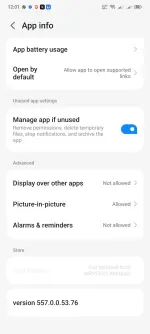
2. Download Facebook Messenger 557.0.0.53.76. Or you can download You do not have permission to view the full content of this post. Log in or register now..
3. Install the app.
4. Done.
If you got this error "App not installed as package conflicts with an existing package." after uninstalling the Messenger app, you can use adb to uninstall the Messenger app.
5. Go to developer options, open wireless debugging. Pair with code. In your computer terminal/termux, make sure you have adb installed.
Type each command.
adb pair ip : port
Type your pairing code. Then
adb connect ip : port
If connected, type
adb uninstall com.facebook.orca
6. Install the app on your phone or you can use adb to install the app.
Navigate to your folder where you have downloaded the apk.
Type
cd <apk path>
adb install <file apk>
7. Wait until success.
FIX MESSENGER BUBBLES GONE
1. Uninstall Facebook and Messenger app.
2. Download MRVPatchManager You do not have permission to view the full content of this post. Log in or register now..
3. Download the Messenger app You do not have permission to view the full content of this post. Log in or register now..
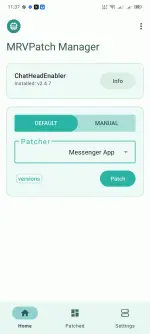
4. Open the MVRPatch Manager, download and install the ChatHeadEnabler.
5. Select Manual, APK Files, select the downloaded Messenger apk, then ρá†ch.
6. Install. If failed, make sure you uninstalled the Facebook app. If error shows: follow the 5th step in the FIX REPLY MESSENGER BUG.
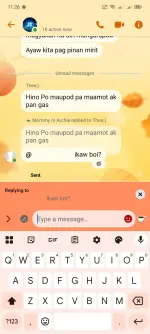
7. Open messenger and go to settings, click the switch, select bubbles, all conversation.


1. Uninstall Messenger app.
2. Download Facebook Messenger 557.0.0.53.76. Or you can download You do not have permission to view the full content of this post. Log in or register now..
3. Install the app.
4. Done.
If you got this error "App not installed as package conflicts with an existing package." after uninstalling the Messenger app, you can use adb to uninstall the Messenger app.
5. Go to developer options, open wireless debugging. Pair with code. In your computer terminal/termux, make sure you have adb installed.
Type each command.
adb pair ip : port
Type your pairing code. Then
adb connect ip : port
If connected, type
adb uninstall com.facebook.orca
6. Install the app on your phone or you can use adb to install the app.
Navigate to your folder where you have downloaded the apk.
Type
cd <apk path>
adb install <file apk>
7. Wait until success.
FIX MESSENGER BUBBLES GONE
1. Uninstall Facebook and Messenger app.
2. Download MRVPatchManager You do not have permission to view the full content of this post. Log in or register now..
3. Download the Messenger app You do not have permission to view the full content of this post. Log in or register now..
4. Open the MVRPatch Manager, download and install the ChatHeadEnabler.
5. Select Manual, APK Files, select the downloaded Messenger apk, then ρá†ch.
6. Install. If failed, make sure you uninstalled the Facebook app. If error shows: follow the 5th step in the FIX REPLY MESSENGER BUG.
7. Open messenger and go to settings, click the switch, select bubbles, all conversation.