 PH
PH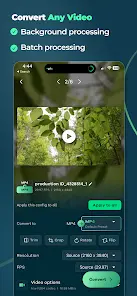
Remux Video Converter & Compressor v3.2.2 [Pro]
Remux is a local video conversion and compression utility that processes files directly on-device without cloud uploads. It supports batch processing, audio extraction, and frame-accurate editing.Technical Specifications
| Category | Details |
|---|---|
| Version | 3.2.2 [Pro] |
| Android Version | 7.0+ |
| Architecture | arm64-v8a |
| Engine | FFmpeg-based |
| Hardware Acceleration | GPU-accelerated encoding (VideoToolbox / Android Hardware) |
| Languages | English, Italian (Interface); Supports 9 global languages |
Format & Codec Support
- Video Formats: MP4, MOV, MKV, WebM, AVI, WMV, FLV, MPG, 3GP, M4V, F4V, TS, MTS, OGV, GIF.
- Audio Formats: MP3, M4A, WAV, AIF, FLAC.
- Codecs: H.264, H.265/HEVC, VP9, AV1, MPEG-2, AAC, Opus, FLAC.
Key Features
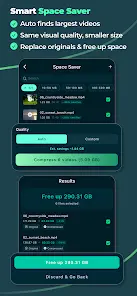
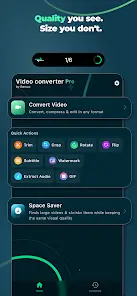
- Video Compression: Space Saver utility scans for large files and applies light, medium, or heavy compression. Manual tuning available via CRF, bitrate, codec profiles, and pixel formats.
- Advanced Editor: Frame-accurate trimming, cropping, rotating, and flipping. Supports resolution adjustment up to 4K and frame rates up to 300 fps.
- Subtitles & Watermarks: Burn SRT, ASS, and VTT subtitles with custom styling. Supports text/image watermarks with opacity and blur controls.
- Batch Processing: Import and apply settings to multiple videos simultaneously using "Apply to All."
- Quick Actions: One-tap shortcuts for GIF creation, audio extraction, and basic transformations.
- Presets: 25+ optimized profiles for Final Cut Pro, After Effects, iMovie, and InVideo, including HDR support.
- Live Activity: Real-time progress tracking via lock screen notifications.
Pro Version Features
- Batch processing and unlimited Space Saver.
- Full format library and 4K export.
- Advanced editing tools (Crop, Rotate, Watermark, Subtitles).
- Access to all 25+ professional presets.
Recent Updates (v3.2.2)
- Stability: Resolved crashes during conversion on Android 16 and sequential save operations.
- Bug Fixes: Fixed issue resulting in 0-byte saved files; corrected handling of non-English filenames.
- Performance: Improved Android hardware encoding speed via FFmpeg integration.
- Logic: Output FPS now caps at the source rate to prevent artificial upscaling.
- Maintenance: Integrated Play Store in-app updates and refined rating prompts.