 PH
PH
Nice Mind Map - Version 11.6.0 (Premium)
Nice Mind Map is a cross-platform productivity suite that integrates mind mapping, task management, and document creation. The application utilizes visual-textual mapping to organize complex information, linking keywords with multimedia elements to facilitate memory retention and project planning.Technical Specifications
| Category | Details |
|---|---|
| Current Version | v11.6.0 (Build 144) |
| OS Requirement | Android 6.0+ |
| Architecture | arm7 + arm64 |
| File Size | 18.8 MB |
| SHA-256 | 1c148b1081e77f9e560c587ece38239ddfd61613df9a396ca5c1510de3724417 |
Core Functionality
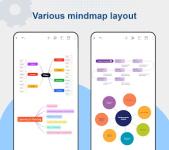
Mind Mapping & Layouts- Structural Variety: Supports multi-layered trees, fish-bone diagrams, table-based mind maps, and logical frameworks.
- Input Methods: Features Text Scan (OCR), PDF Scan, and LaTeX support for technical documentation.
- Editing Tools: Multi-sheet support, sub-subject focus mode, node movement, copy/paste functionality, and floating topics.
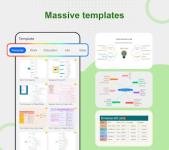
- Customization: Multiple templates (Personal, Work, Education, Life) and adjustable themes, styles, colors, and fonts.
- TODO List: Integrated task management with priority/progress markers and calendar reminders.
- Quick Doc: Lightweight document editor within the mind map environment.
- Outline Mode: Synchronized outline view for linear data representation.
- Presentation Mode: Built-in tool for displaying maps in a professional setting.
- Attachments: Supports insertion of images (with cropping), emojis, audio files, hyperlinks, and summaries.
- Cloud Sync: Native synchronization with Google Drive and OneDrive.
- Export Formats: PNG, PDF, OPML, and Markdown.
New in Version 11.5/11.6
- AI Integration: Automated conversion of long-form text and files into structured mind maps.
- Markdown Support: Direct pasting of .md formatted text to generate map nodes.
- Desktop Synergy: PC version compatibility for cross-device workflows.
- Optimizations: Bug fixes and dark mode support.
Application Use Cases
- Academic: Course notes, lesson preparation, semester planning, and vocabulary memorization.
- Business: Meeting shorthand, project planning, qualitative analysis, and brainstorming.
- General: Creative writing, goal setting, shopping lists, and personal resumes.