 PH
PHdiscuss3387
Established
Description
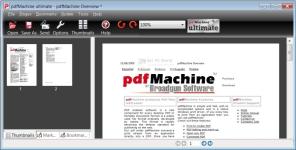
Description: The easy way to make a PDF. Just print to the "Broadgun pdfMachine printer" and that's it - you have a PDF! Easy to assemble a PDF from multiple sources - just print each document and they automatically append to the open PDF.
Using optical character recognition (OCR) scanned PDFs can be converted into searchable text that is stored invisibly with the PDF when saved. This allows readers of the PDF to search the PDF for the text, and also to copy and paste the converted text. More details
Use pdfMachine to redact (permanently remove) blocks of text and images from the PDF, replacing them with black blocks. The information is removed, not just hidden. Redaction provides a means to protect sensitive or confidential information.Details here.
The stamper is a nice way to ask a user to fill out a form then have the results of that form "stamped" onto the PDF. Details here.
The Split PDF functionality allows you to split or 'explode' a PDF into smaller PDFs. You can split per page or per set number of pages. Details here.
Allows you to specify a directory for monitoring by pdfMachine. New PDFs appearing in that directory will be launched by pdfMachine as if the were printed. This includes applying any updates configured in the pdfMachine options. Details here.
The flatten feature allows you to embed annotations, form fields, and other interactive elements directly into the content of a PDF. This process converts these elements into regular, non-interactive content. Flattening can be useful for ensuring that your PDF looks the same on all devices and for preventing further modifications to form fields and annotations. Details here.
The orientate and deskew button found on the Page Controls toolbar allows you to easily tidy scanned pages. It will straighten the pages in the PDF and adjust the orientation where required eg portrait to landscape. This means you don't have to spend the time rotating the pages yourself.
Place text annotations, emojis, shapes, lines and arrows on a PDF.
Text highlighting, strike-out and underlining.
Details
- File Size: 22.1 MB
Download Links
You do not have permission to view the full content of this post. Log in or register now.
You do not have permission to view the full content of this post. Log in or register now.
You do not have permission to view the full content of this post. Log in or register now.