 PH
PH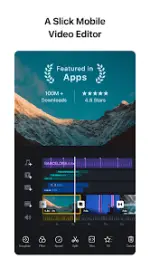

VN - AI Video Editor (Pro)
VN is a multi-track video editing application designed for both mobile and desktop environments. It supports professional-grade editing workflows without watermarks, featuring non-destructive editing and high-resolution export capabilities.Technical Specifications
| Category | Details |
|---|---|
| Version | v2.13.0 (Build 6753) |
| Android Requirement | 7.0+ |
| Architecture | arm64-v8a |
| Screen DPI | 160dpi, 240dpi, 320dpi, 480dpi, 640dpi |
| Export Support | Up to 4K resolution, 60 FPS |
| Mod Status | Pro Activated; Debug info removed |
Core Features
Multi-Track Editing & Timeline
- Quick Rough Cut: PC-style track design allowing for material zooming and keyframe selection as precise as 0.05 seconds.
- Timeline Management: Support for multiple tracks including PIP (picture-in-picture), photos, stickers, and text.
- Non-Destructive Editing: Support for unlimited undo/redo with draft saving that preserves original image data.
- Intuitive Controls: Gesture-based deletion and drag-and-drop reordering of clips.
Advanced Visual Tools
- Speed Curve: Time remapping tool with 6 preset curves, similar to Adobe Premiere Pro functionality.
- Keyframe Animation: 19 built-in animation effects with support for custom curves.
- Color Grading: Support for importing custom LUT (.cube) files and built-in cinematic filters.
- Special Effects: Reverse playback, zoom effects, and 1.5-second freeze frame generation.
Audio & Asset Management
- Music Beats: Markers to sync video cuts to audio rhythms.
- Voice Processing: High-quality voice-over recording and integrated audio denoise tools.
- Flexible Import: Bulk import via Zip files or Wi-Fi for music, sound effects, fonts, and stickers.
- Text Engine: Customizable text templates with adjustable spacing, size, color, and font styles.
Workflow & Security
- Cross-Platform Collaboration: Project transfer between mobile and desktop via Google Drive or OneDrive.
- Protection Mode: Ability to set expiration dates and passwords for shared drafts and templates.
What's New in v2.13.0
- Voice Effects: Added 15 new voice profiles.
- Custom Transitions: Expanded options for transition effects.
- Audio Quality: Enhanced denoise algorithms for clearer output.
- UX Updates: Default fill style updated to "Fit" when modifying aspect ratios.
- Performance: General bug fixes and stability improvements.