 PH
PH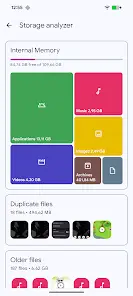

Solid Explorer File Manager
Solid Explorer is a dual-pane file management application designed for Android, featuring advanced encryption, cloud integration, and network storage support.Application Specifications
| Category | Details |
|---|---|
| Android Version | 6.0+ |
| Current Version | v3.4.8/9 |
| Layout | Dual-pane commander style |
| Search | Indexed search with file size/type filters |
| Desktop Support | Chromebook compatible (Mouse/Keyboard input) |
Core Functionality
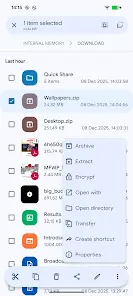
- File Operations: Comprehensive management of internal storage, SD cards, and USB OTG. Includes batch renaming with pattern support.
- Security: AES encryption with secure folder support. Access is restricted via password or fingerprint. Encrypted files remain protected even if the application is uninstalled.
- Storage Analysis: Folder property analysis provides percentage-based space usage and identifies the largest files.
- Root Access: Includes a root explorer for browsing system files on rooted devices.
- Media Support: Built-in image viewer, music player, and text editor.
- Collections: Automated categorization for Downloads, Recents, Photos, Videos, Music, Documents, and Apps.
Network and Cloud Integration
| Connection Type | Supported Protocols / Providers |
|---|---|
| Cloud Storage | Google Drive, OneDrive, Dropbox, Box, Owncloud, SugarSync, MediaFire, Yandex, Mega (Mega requires add-on) |
| NAS / Network | FTP, SFTP, SMB (Samba), WebDav |
| Local Hosting | Built-in FTP Server for PC access |
Archive Management
- Supported Formats: ZIP, 7ZIP, RAR, TAR.
- Capabilities: Create and extract archives; RAR extraction support.
Release Notes (v3.4.8/9)
- Resolved storage usage reporting mismatches.
- Fixed RAR extraction issues.
- General stability and minor bug fixes.
Modification Details
- Full/Premium features unlocked (No additional key required).
- Removed advertisement permissions, services, and layouts.
- Disabled Analytics, Crashlytics, and Firebase tracking.
- Removed debug code and startup triggers.
- Optimized AndroidManifest by removing unnecessary receivers and providers.