 PH
PH
App Overview: Photo & Picture Resizer
Photo & Picture Resizer is a utility for Android designed to modify image dimensions and file sizes while maintaining aspect ratios and visual quality. The application automates the saving process to a dedicated directory and supports batch processing for efficiency in workflows involving email attachments or web form submissions.Technical Specifications
| Category | Details |
|---|---|
| Android Version | 8.0+ |
| Latest Update | Android 15 adaptation |
| Output Directory | Pictures/PhotoResizer |
| Architecture Support | Armeabi-v7a, Arm64-v8a, X86, X86_64 |
| DPI Support | Ldpi, Mdpi, Tvdpi, Hdpi, Xhdpi, Xxhdpi, Xxxhdpi |
| Language Support | Global (Multilingual including EN, ES, FR, DE, ZH, HI, RU, etc.) |
Core Features
- Batch Processing: Resize multiple images simultaneously.
- Non-Destructive Editing: Original files remain unaltered; resized versions are saved independently.
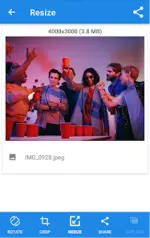
- Quality Retention: Compression algorithms maintain clarity even after multiple resize cycles (e.g., reducing a 4MB file to ~400KB at 800x600 resolution).
- Navigation: Integrated gesture-based photo browsing.
- Scaling Options: Supports downsizing, scaling, and enlarging images.
Resolution and Aspect Ratio Control
| Parameter | Options |
|---|---|
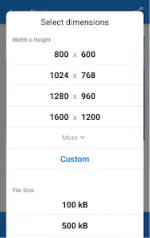
| Preset Resolutions | 1920x1080, 2048x1152 (YouTube Banner standard) |
| Custom Dimensions | User-defined width and height |
| Aspect Ratios | 2x3, 16x9, or custom configurations |
| Target Size | Specific output targets in KB or MB |
Use Cases
- Email Optimization: Reduces file sizes to bypass attachment limits (e.g., 5MB limit constraints).
- Social Media Integration: Optimization for platforms including YouTube, Pinterest, Reddit, and VKontakte.
- Web Services: Adjusting image specifications for web forms and text messages.