 PH
PH

Noteshelf 3
Noteshelf 3 is a digital note-taking platform designed for handwriting, PDF annotation, and organized documentation. It features a customizable interface and integrated AI tools to streamline productivity across Android devices.Key Technical Specifications
| Category | Details |
|---|---|
| Version Compatibility | Android 11.0+ |
| CPU Architecture | Armeabi-v7a, Arm64-v8a |
| Supported Languages | DE, ES, FR, IT, JA, KO, ZH, ZH-HK, ZH-TW |
| Handwriting Recognition | 65 Languages |
| Screen DPI Support | Ldpi, Mdpi, Tvdpi, Hdpi, Xhdpi, Xxhdpi, Xxxhdpi |
| Cloud Sync & Backup | Google Drive, OneDrive, Dropbox, WebDAV, Evernote (Auto-publish) |
| Security | Password, Face ID, Touch ID |
Core Features
Personalization & Tools- Ink Engine: Lifelike pens (fountain pen included) and highlighters.
- Custom Toolbar: Fully re-arrangeable, add, or remove tools to match workflow.
- Templates: Library of 200+ templates including planners, trackers, and journals.
- Paper Styles: Lined, dotted, or grid papers with adjustable colors and spacing.
- Digital Diaries: Configurable digital journals for task management.
- Handwriting to Text: OCR support for 65 languages; searchable handwritten notes.
- Audio Recording: Synchronized audio recording during note-taking sessions.
- Shape Recognition: Auto-correct strokes into geometric shapes for flowcharts.
- Advanced Imaging: Background removal, freeform cropping, and Unsplash/Pixabay integration.
- Document Management: Multi-level categorization (groups/subgroups) and custom bookmarks.
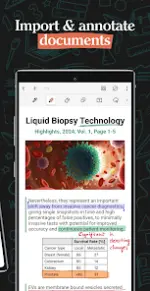
- PDF Tools: Precision annotation, highlighting, and underlining for imported PDFs.
- Document Scanner: Integrated physical-to-digital document scanning.
- Multitasking: Multiple windows support for side-by-side notebook viewing.
- Generation: Automated handwritten note generation on specified topics.
- Content Processing: Summarization, translation, and explanation of complex terms.
New in this Version
- Scribble to Erase: Ability to erase ink by scribbling over it (toggle via Pen settings).
- Performance: Minor bug fixes and general performance optimizations.